How To Turn Off Your Caller Id

Ever wondered about the little mystery that appears on your phone when someone calls? That "Unknown" or "Private Number" can spark curiosity, and sometimes, you might want to be that mystery yourself! Turning off your caller ID is a neat trick that can be surprisingly handy, and thankfully, it's usually a pretty straightforward process. It’s a bit like having a secret identity for your phone calls, and who doesn't enjoy a little bit of fun with technology?
So, who might find this handy? For beginners dipping their toes into the world of phone privacy, it's a simple way to experiment and understand how your phone number is shared. Think of it as learning the basics of digital anonymity. For families, it can be a useful tool. Perhaps a parent wants to call their child's school without their personal number showing up, or maybe a teenager wants to call a friend's house without their parents seeing an unfamiliar number. It offers a bit of extra control and peace of mind in various situations. And for the hobbyists out there who enjoy exploring the nuances of communication technology, it's another feature to understand and utilize. It’s about knowing your options and how to manage them!
Let's talk about some real-world scenarios. Imagine you're calling a doctor's office or a place you're applying for a job. While you want them to be able to reach you back, you might not want your personal number readily available on their contact list if it's just for a quick inquiry. Or, perhaps you're involved in a community project and need to make multiple calls to people you don't know well. Hiding your caller ID can make those initial interactions feel a little less intrusive for both parties. You can also think of it in terms of bulk calling – for instance, if you're organizing an event and need to reach out to many people without revealing your personal number to everyone. It’s about thoughtful communication.
Must Read
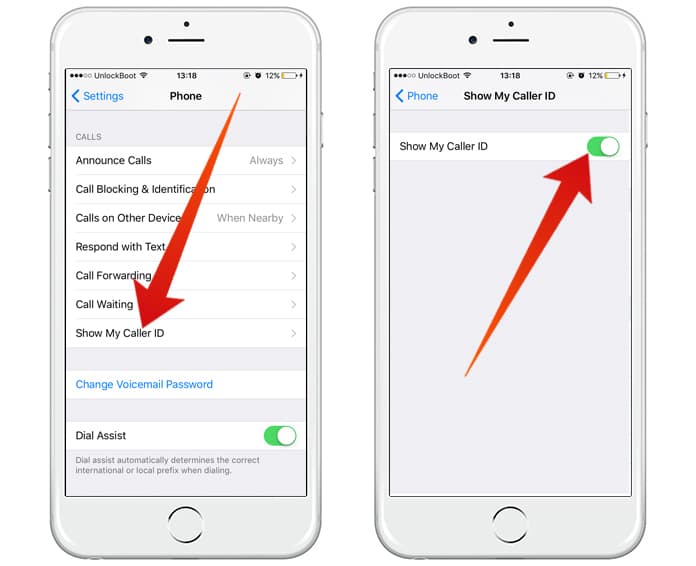
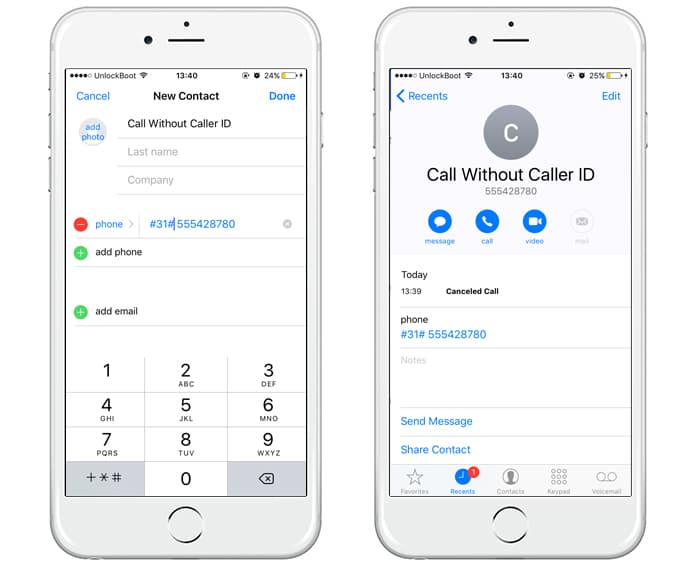
Getting started is simpler than you might think! Most of the time, you can achieve this directly from your smartphone's settings. For iPhones, you'll typically go to Settings > Phone > Show My Caller ID, and then you can toggle it off. For Android phones, the path can vary slightly depending on your device and carrier, but generally, you'll look in your Phone app settings, often under "Calls" or "More settings," and find an option related to "Caller ID" or "Show my caller ID." Don't worry if you can't find it immediately; a quick search for "[Your Phone Model] hide caller ID" will usually give you step-by-step instructions. Some mobile carriers also offer a service to block caller ID for specific calls. You can often do this by dialing a short code like #67 before the number you are calling. It’s like a temporary privacy shield!
So there you have it! Turning off your caller ID is a simple yet effective way to add a layer of privacy to your phone calls. Whether you're using it for practical reasons, a touch of anonymity, or just to explore how your phone works, it’s a valuable feature to know. It’s a small change that can offer a surprising amount of convenience and control, making your everyday calls a little more interesting and manageable. Enjoy the mystery!