What Performance Benchmarks Should I Look For In Woocommerce Hosting
So, you've finally done it! You've launched your very own WooCommerce store, dreamed up in the wee hours and polished with countless cups of coffee. It’s like finally getting your masterpiece in front of the world. But now comes the slightly less glamorous, yet utterly crucial, part: making sure your digital storefront can actually handle the rush. Think of it like opening a physical shop. You wouldn’t dream of putting up a "Grand Opening!" sign without ensuring you’ve got enough stock, a capable cashier, and maybe even a friendly face to greet customers, right? Well, your WooCommerce hosting is the invisible backbone of all that.
And when it comes to picking this digital real estate, you’ll hear a lot of fancy techy terms thrown around. It can feel like trying to decipher a secret code, especially when you just want your online boutique to hum along like a well-oiled sewing machine. Fear not, my fellow e-commerce explorer! We’re going to break down the performance benchmarks that actually matter, in a way that won't make your brain feel like it’s doing a triple backflip. We'll keep it light, relatable, and hopefully, a little bit funny.
Speed is King (and Queen, and the whole Royal Court)
Let's start with the big kahuna: website speed. Imagine this: you walk into a store, and the cashier takes a solid minute to even acknowledge you. Then, another minute to find the item you want, and a further two minutes to ring it up. You'd probably walk out, wouldn't you? Customers are exactly the same online. They have the attention span of a goldfish on a caffeine crash. If your WooCommerce site is slower than a snail on molasses, they're outta there faster than you can say "abandoned cart."
Must Read
So, what kind of speed are we talking about? Well, the general consensus is that your pages should load in under 2-3 seconds. Anything longer, and you're basically telling potential customers to go hang out on a competitor's zippy site. Think of it as the difference between a sleek sports car and a rusty old tractor trying to get to the finish line. Your hosting is the engine under the hood, and a powerful one means a lightning-fast ride for your customers.
TTFB: The Silent Killer (or Saver)
Now, within the realm of speed, there's a tiny little metric that gets a lot of love from the tech gurus: Time to First Byte (TTFB). Don't let the name intimidate you. It's basically how long it takes for your server to send back the very first piece of information after a visitor clicks on a link to your page. Think of it as the time it takes for the barista to pull the first shot of espresso after you've placed your order. A good TTFB means they're already whirring away, setting you up for a quick drink. A bad TTFB is like them just standing there, contemplating the universe, before they even turn on the espresso machine. Annoying, right?
For WooCommerce, a good TTFB should ideally be under 200 milliseconds (ms). Anything above 500ms is starting to sound like a dial-up modem in the digital age. If your hosting provider boasts about their TTFB, pay attention! It's a pretty strong indicator of how quickly your server can respond to requests, which directly impacts your page load times. It's the unsung hero of a speedy site.
This is especially important for WooCommerce because, let's be honest, e-commerce sites can be a bit… chunky. You've got product images, descriptions, reviews, maybe even some fancy animations. All that data needs to be fetched from your server. If that initial handshake is slow, everything else gets delayed. It's like trying to build a LEGO castle when the baseplate takes ages to arrive.
Uptime: Is Your Shop Open or Closed?
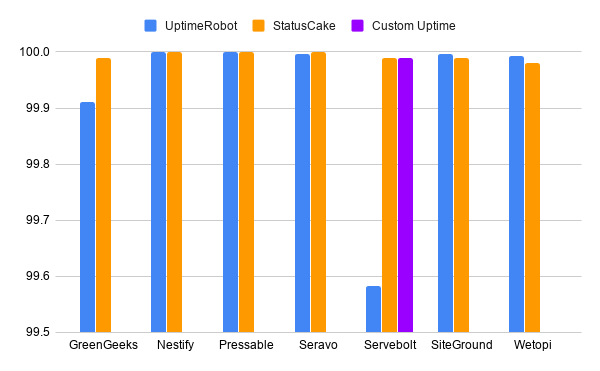
Next up, we have uptime. This one's pretty straightforward, but incredibly important. Uptime is simply the percentage of time your website is actually online and accessible to your customers. Imagine you're a baker, and your shop is supposed to be open from 9 am to 5 pm. But every now and then, you just decide to close up shop for an hour or two, without any warning. Your loyal customers will get frustrated, right? They'll go find their croissants elsewhere.

For your WooCommerce store, this translates to lost sales. Every minute your site is down is a minute someone can't buy your amazing products. Hosting providers usually advertise their uptime in percentages, like "99.9% uptime." Now, 99.9% sounds pretty darn good, almost perfect. But let's do some quick (and slightly depressing) math.
A 99.9% uptime means your site could be down for approximately 8.76 hours per year. That might not sound like a lot, but in the fast-paced world of e-commerce, that's a significant chunk of potential business lost, especially during peak shopping seasons like Black Friday or the holidays. Think of it as a slightly less enthusiastic cashier who occasionally goes on coffee breaks for extended periods.
What you really want to aim for is 99.99% uptime or higher. That translates to about 52 minutes of downtime per year. That’s much better! It means your digital doors are practically always open, ready to welcome shoppers. Look for hosting providers who offer an uptime guarantee, and ideally, one that’s backed by a service level agreement (SLA). It's like getting a promise from your landlord that the roof won't leak, and if it does, they'll fix it pronto.
What Does "Downtime" Really Mean for You?
When your site is down, it's not just a technical glitch. It’s potential customers bouncing off your virtual doorstep. They might see an error message, a blank page, or even a "site under maintenance" notice. This erodes trust. If they can't access your store, they'll assume it’s unprofessional or unreliable, and they’ll move on. It’s like showing up to a restaurant and finding the doors locked and a "Closed Indefinitely" sign on the window. You're not coming back.
For WooCommerce, where every sale counts, this is a big deal. You've worked hard to get traffic to your site, whether through SEO, social media, or ads. All that effort is wasted if the site isn't available when people arrive. So, while a good TTFB is about how fast your site is, uptime is about whether it's there at all. Both are essential for a healthy online business.
Server Resources: The Engine Size and Fuel Tank
Now let's talk about what's actually powering your website: your server resources. Think of your server as the engine of your car. You can have a sleek exterior and a fancy paint job, but if the engine is a sputtering little thing designed for a scooter, it's not going to get you very far, especially when you've got a whole convoy of customers to transport.
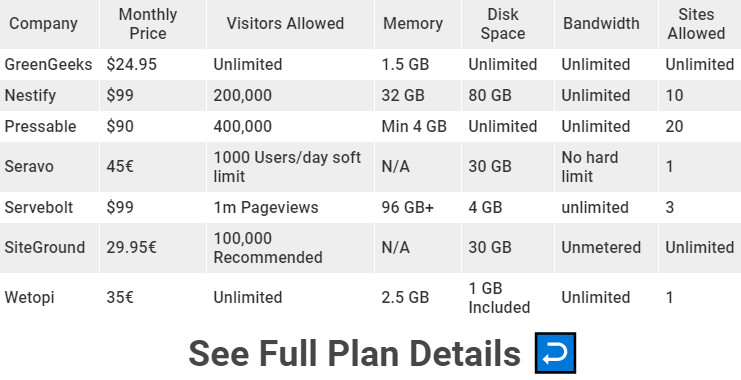
For WooCommerce, the key server resources to keep an eye on are CPU (Central Processing Unit) and RAM (Random Access Memory). These are like the brain and short-term memory of your server.
CPU: The Brains of the Operation
The CPU is your server's brain. It handles all the calculations and processes that keep your website running. Every time someone visits your site, clicks on a product, adds something to their cart, or checks out, the CPU is working overtime. If your CPU is underpowered, it’s like trying to have a conversation with someone who keeps forgetting what you just said. Your website will start to feel sluggish, especially when you have multiple people browsing simultaneously.
For a busy WooCommerce store, you want a hosting plan that offers dedicated or semi-dedicated CPU resources. This means that the CPU power allocated to your site isn't being shared with dozens or hundreds of other websites, like in a crowded public park. On shared hosting, your site might be competing for CPU cycles with everyone else on the server. It's like trying to get a word in edgewise at a raucous party. You might get heard eventually, but it’s a struggle.
If you see terms like "shared CPU" or "burstable CPU" on a plan, tread with caution for a growing WooCommerce business. Dedicated resources ensure that when your store gets busy, your website has the processing power it needs to respond quickly, without bogging down.
RAM: The Short-Term Memory
RAM is your server's short-term memory. It's where active data is stored for quick access. When a visitor browses your site, the server needs to quickly pull up product information, images, and other data. The more RAM your server has, the more data it can keep readily available, leading to faster page loads. Think of it like having a well-organized desk with all your frequently used tools and documents within easy reach, versus having to rummage through filing cabinets every time you need something.
For WooCommerce, having sufficient RAM is crucial, especially if you have a large product catalog or a lot of plugins. Plugins, while incredibly useful, can often be RAM-hungry. If your server runs out of RAM, it has to start swapping data to slower storage (like a hard drive), which dramatically slows down your website. It's like your brain trying to recall something, but it's gotten so overloaded that it's forgotten where it put the information.
Look for hosting plans that clearly state the amount of RAM allocated to your account, or offer dedicated RAM. If you’re starting small, you might get away with less, but as your traffic grows and you add more functionality, more RAM becomes a non-negotiable. It's the difference between a smooth, flowing conversation and a series of awkward pauses.
Disk I/O: The Speed of Data Access
Let’s talk about Disk I/O (Input/Output). This might sound a bit technical, but think of it as the speed at which your server can read from and write to its storage (its hard drive). Imagine your server's storage as a giant library. Disk I/O is how quickly the librarian can find and retrieve the books you request. If the librarian is slow, or the shelves are disorganized, you're going to be waiting a while for that crucial piece of information.
For a WooCommerce store, this is important because your website's data – your product images, order information, customer details, the actual WordPress and WooCommerce files – all reside on the server's storage. When someone visits your site, the server needs to access these files rapidly to display the page. Slow disk I/O means slow loading times.
The gold standard here is Solid State Drives (SSDs). If your hosting provider isn't using SSDs, you might be using older, much slower Hard Disk Drives (HDDs). SSDs are like the super-fast sports cars of storage, while HDDs are more like those charmingly slow, but somewhat cumbersome, old bicycles.
When you're comparing hosting plans, look for mentions of SSD storage. This is a significant performance booster for any website, but especially for data-intensive applications like e-commerce. It ensures that your site can access the information it needs in a blink of an eye, rather than having to wait for the data to be physically “found” on slower drives. It's like having a super-efficient assistant who can fetch you any document you need instantly.
Scalability: Can Your Hosting Grow With Your Empire?
Finally, and this is a big one, we need to talk about scalability. Think about your business like a tiny sapling. You're hoping it grows into a mighty oak tree, right? Well, your hosting needs to be able to grow with it. What happens when your marketing campaigns are a massive success, and suddenly your little shop is flooded with customers? If your hosting plan is like a tiny tent that can only hold a few people, it's going to collapse under the pressure.
Scalability means that your hosting provider can easily accommodate increased traffic and resource demands. Can you upgrade your plan with minimal downtime? Can you add more storage, more RAM, or more processing power as needed? This is where different types of hosting come into play. Shared hosting is like living in a busy apartment building – you have neighbors, and sometimes their noise can affect you. It's affordable, but not great for scaling.
Managed WordPress hosting or VPS (Virtual Private Server) hosting generally offers better scalability. With these options, you have more dedicated resources and more control. Think of it like upgrading from that apartment to a small house, and then potentially to a larger mansion as your family (and customer base) grows.
You want a hosting provider that makes it easy to transition to a more robust plan without a major overhaul. This might mean a simple button click to upgrade resources or seamless migration options. The last thing you want is to have your business booming and then have to scramble to find new hosting because your current provider can't keep up. It’s like realizing your business is taking off, but your runway is too short for the plane!
When you're evaluating hosting, ask them about their upgrade paths and how quickly you can scale. A good host will have clear, straightforward options for growth. They’ll be happy to help you plan for success, rather than leaving you stranded when things get busy. It’s about having a partner who believes in your growth, just as much as you do.
So, there you have it! Speed, uptime, robust server resources (CPU, RAM, Disk I/O), and the all-important scalability. These are the key performance benchmarks that will ensure your WooCommerce store is not just online, but thriving. Don't get bogged down in jargon. Think about it in terms of your own daily life, and you'll find the perfect digital home for your online empire. Happy selling!