How To Add Meta Keywords In Wordpress

Hey there, digital denizens and web wanderers! Ever feel like your fantastic WordPress blog is a hidden gem, sparkling away in the vastness of the internet, but just… not getting found? You pour your heart and soul into crafting killer content, sharing your expertise, your hilarious anecdotes, or even just your amazing sourdough starter pics, and then crickets. It's like throwing a killer party and forgetting to send out the invites. Well, buckle up, buttercups, because we're about to unlock a little secret weapon in your SEO arsenal: meta keywords.
Now, before you start picturing ancient scrolls and dusty libraries, let's demystify this. Meta keywords are, in essence, like tiny, invisible tags you attach to your web pages. They’re a snippet of information that tells search engines (think Google, Bing, DuckDuckGo – the digital bouncers at the internet club) what your page is all about. Think of it as giving your content a little name tag, so the right people can find you.
The "What's the Big Deal?" Section
Okay, so here's where things get a little nuanced, like trying to explain meme culture to your grandma. For a long time, meta keywords were the undisputed champions of SEO. People would stuff them like a Thanksgiving turkey, hoping to catch every single search query imaginable. It was the Wild West of the internet, and keywords were your trusty six-shooter.
Must Read
However, as the internet evolved (and let's be honest, sometimes it evolves faster than we can keep up with, much like TikTok trends), search engines got smarter. They realized that simply listing keywords wasn't a true reflection of content quality or user intent. So, the big players, especially Google, have largely de-emphasized meta keywords as a direct ranking factor. It’s like those old-school landline phones – they still work, but nobody’s really using them for their primary communication anymore.
But wait! Don't throw your digital party hats away just yet. While they might not be the golden ticket to the top of the search results, meta keywords still serve a purpose, especially for certain search engines and for your own organizational sanity. Plus, in the spirit of being thorough and giving your content the absolute best chance to be seen, why wouldn't you add them? It’s like having an extra sprinkle of parmesan on your pasta – doesn't hurt, might even make it better!
Why Bother, Then? The "Still Kinda Useful" Edition
Think of it this way: your website is a beautifully curated gallery. Meta keywords are like the little descriptive plaques next to each artwork. They provide context. Even if a casual visitor might skip the plaque, an art critic (or a dedicated search engine) might appreciate the concise summary.
Here are a few reasons why dipping your toes into meta keywords is still a good idea:
- Other Search Engines: While Google might be the elephant in the room, other search engines still give meta keywords a nod. If you're aiming for a broader reach, why limit yourself?
- Internal Site Search: Some WordPress themes and plugins use meta keywords to improve your website's internal search function. This means visitors searching within your site will get more relevant results. It’s like having a super-efficient librarian for your own digital library.
- Content Organization: For you, the content creator, thinking about your meta keywords is a fantastic way to crystallize the core themes of your post. It forces you to be precise about your topic, which can lead to even better content. It’s like a mental decluttering exercise for your brain.
- Historical Context & Future-Proofing: The internet is a dynamic beast. What’s less important today might become a factor again tomorrow. Staying informed and using best practices, even if they're "old school," keeps you agile. Think of it as keeping your vintage record player in good working order – you never know when you'll want to spin some vinyl.
Okay, I'm Intrigued! How Do I Actually Do This in WordPress?
This is where the magic happens, and thankfully, in WordPress, it's surprisingly straightforward. You don't need to be a coding ninja or have a degree in digital alchemy. We're talking about the easy-going, laid-back approach to making your site shine. Most of the heavy lifting is done by trusty plugins, the superheroes of the WordPress universe.
The Plugin Power-Up: Your New Best Friend
If you're running a WordPress site, chances are you've already dabbled with plugins. They're the little apps for your website, adding all sorts of cool features. For meta keywords, the most popular and effective way to go is by using an all-in-one SEO plugin. These plugins are designed to help you with all sorts of SEO tasks, and meta keywords are usually a part of the package.
The reigning champions in this arena are:
- Yoast SEO: This is arguably the most popular SEO plugin for WordPress, and for good reason. It’s robust, user-friendly, and packed with features. It even gives you a little traffic light system for your SEO analysis, which is surprisingly satisfying.
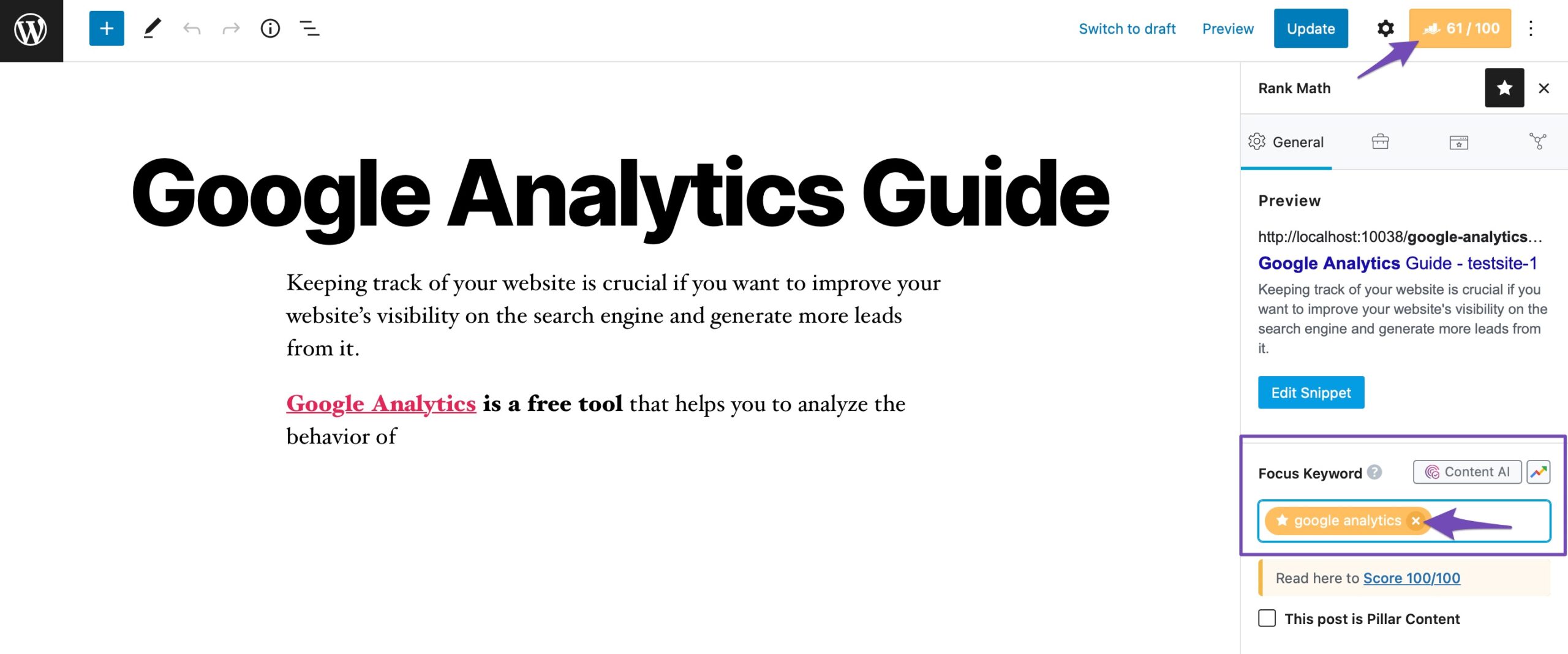
- Rank Math: A strong contender that’s gaining serious traction. Rank Math offers a ton of features, including meta keyword management, often at a more competitive price point or with a more generous free tier.
- All in One SEO Pack: Another long-standing and reliable option. It’s been around for ages and provides a solid set of SEO tools.
Let's walk through the general process using one of these titans, say, Yoast SEO, as an example. Don't worry if you're using Rank Math or another plugin; the principles are very similar.

Step-by-Step: The Meta Keyword Ballet
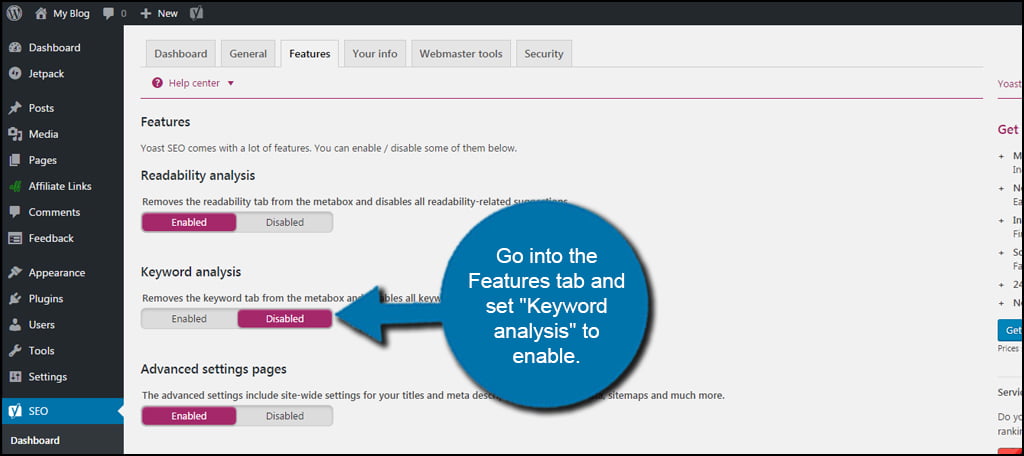
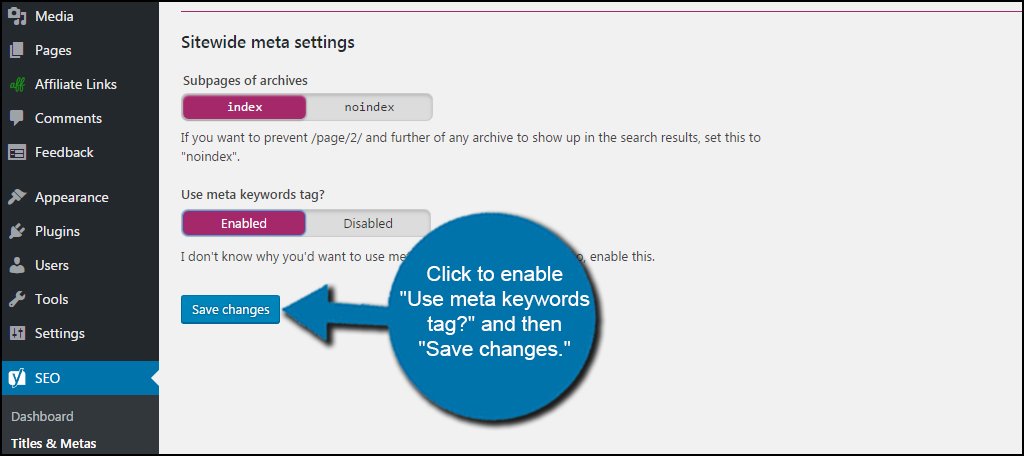
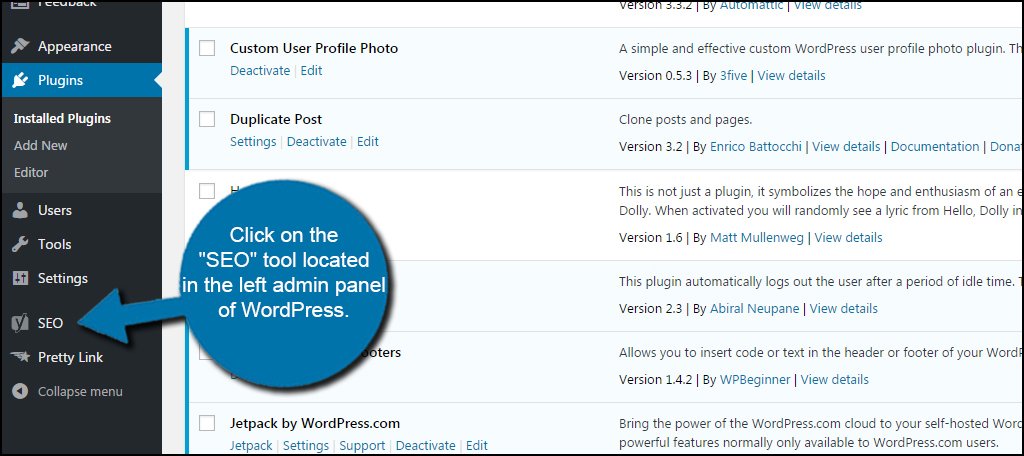
- Install Your SEO Plugin: If you haven't already, navigate to your WordPress Dashboard. Go to Plugins > Add New. Search for "Yoast SEO" (or your preferred plugin). Click "Install Now" and then "Activate." Easy peasy.
- Edit Your Post or Page: Now, head over to the post or page you want to add meta keywords to. Scroll down below your content editor. You'll see a new section, usually labeled "Yoast SEO" or similar. This is your SEO command center.
- Find the Meta Keywords Field: Within the SEO plugin's metabox, you'll usually find a field specifically for "Keywords" or "Focus Keywords." This is where the magic happens.
-
Brainstorm Your Keywords: This is the creative part! Think about what terms someone would actually type into Google to find your content.
- Be specific: Instead of "dogs," think "golden retriever training tips" or "best dog food for sensitive stomachs."
- Think like your audience: What language do they use? What are their pain points?
- Mix it up: Include a few broad terms and some more niche, long-tail keywords.
- Avoid keyword stuffing: This is crucial! Don't just list dozens of unrelated keywords. It looks spammy and won't help. Aim for 3-5 highly relevant keywords.
Fun Fact: The term "keyword stuffing" was so prevalent in the early days of SEO that some search engines used to penalize sites for it. It's like showing up to a potluck with nothing but a giant bowl of just salt.
- Enter Your Keywords: Type your chosen keywords into the field, usually separated by commas. Your SEO plugin will often guide you on how many is too many.
- Update Your Post: Once you're happy with your keywords, hit that "Update" or "Publish" button. And voilà! You've just added meta keywords to your page.
Pro Tip: For a more robust keyword strategy that goes beyond just meta keywords, consider using tools like Google Keyword Planner, Ahrefs, or SEMrush. They offer deep insights into what people are actually searching for, helping you create content that truly resonates.
A Note on Meta Descriptions
While we're talking about meta information, it's worth mentioning meta descriptions. These are the short snippets of text that appear under your title in search results. While not meta keywords, they are EXTREMELY important for click-through rates. Most SEO plugins will have a dedicated field for meta descriptions. Make them compelling and informative!
The Art of Selecting the Right Keywords
Choosing keywords isn't just about throwing random words at the wall and seeing what sticks. It’s a bit of an art form, a strategic dance with the search engines and, more importantly, with your ideal reader.
Imagine you've written a passionate post about your adventures hiking the Appalachian Trail. What would someone type to find that?

- "Appalachian Trail hike" (Good, but broad)
- "Appalachian Trail thru-hike tips" (Better, more specific)
- "What to pack for Appalachian Trail hike" (Even better, targeting a specific need)
- "My experience hiking the Appalachian Trail in spring" (Super specific, long-tail keyword)
See the progression? The more specific you are, the more likely you are to attract someone who is genuinely interested in exactly what you're offering. It's like the difference between asking for "food" at a restaurant and asking for "the vegetarian lasagna with extra garlic." You're much more likely to get what you truly want with the latter.
Cultural Cache & Keywords: A Surprising Connection
Think about the language used in pop culture. If you're writing about vintage fashion, keywords like "70s disco style," " Audrey Hepburn glamour," or "grunge revival" will resonate far more than just "clothes." These are the terms that evoke a feeling, a time, a movement. They're not just descriptive; they're cultural touchstones.
Similarly, if your blog is about artisanal coffee, keywords like "pour-over brewing techniques," "single-origin espresso beans," or "latte art tutorials" will connect with enthusiasts who speak that language. It’s about understanding the vernacular of your niche.
Fun Fact: The concept of "long-tail keywords" (those longer, more specific phrases) accounts for a huge percentage of search queries. People often know what they want, they just don't know the exact single word for it.

Putting It All Together: A Mindset Shift
Adding meta keywords isn't about a magic bullet. It's about demonstrating a thorough understanding of your content and a genuine desire to connect with your audience. It's about being as clear and as welcoming as possible to anyone who might be looking for what you have to offer.
Think of your website not just as a place to broadcast your thoughts, but as a vibrant hub where people can discover solutions, inspiration, or just a good laugh. Meta keywords, alongside well-written content and a clear meta description, are simply another way to make that discovery process smoother and more effective.
It's like leaving a trail of breadcrumbs for your readers, but instead of Hansel and Gretel getting lost, they're finding exactly what they're looking for – which, in this case, is your awesome content!
A Little Reflection for Your Day
In our daily lives, we’re constantly trying to communicate effectively. Whether it’s explaining a complex idea to a colleague, sharing a recipe with a friend, or simply asking for directions, clarity is key. We choose our words carefully to ensure we're understood. Adding meta keywords to your WordPress site is a digital manifestation of that same principle.
It’s a small but deliberate act of making your online presence more accessible, more discoverable, and ultimately, more helpful to others. And in a world that can sometimes feel a little overwhelming and chaotic, anything that makes connection and discovery easier is a win in my book. So go forth, add those keywords, and let your fantastic content shine!