How To Reverse A List In Python

Ever find yourself staring at a string of words, numbers, or even a jumble of characters, and suddenly think, "Wouldn't it be fun if this was... backward?" Like a mischievous thought in your brain, right? Well, in the magical land of Python, this is totally achievable, and it’s surprisingly delightful.
Imagine you have a list of your favorite ice cream flavors: vanilla, chocolate, strawberry. Now, what if you wanted to read them in reverse order? Like unwinding a delicious yarn ball of taste? Python makes this little trick incredibly easy, and honestly, a bit of a joy to play with.
It’s like having a secret superpower for your data. You can take anything that’s neatly ordered and, with a flick of a digital wrist, turn it upside down. Think of it as giving your list a little makeover, a playful spin to see it from a different perspective. It's not just about changing the order; it's about the sheer fun of knowing you can do it so effortlessly.
Must Read
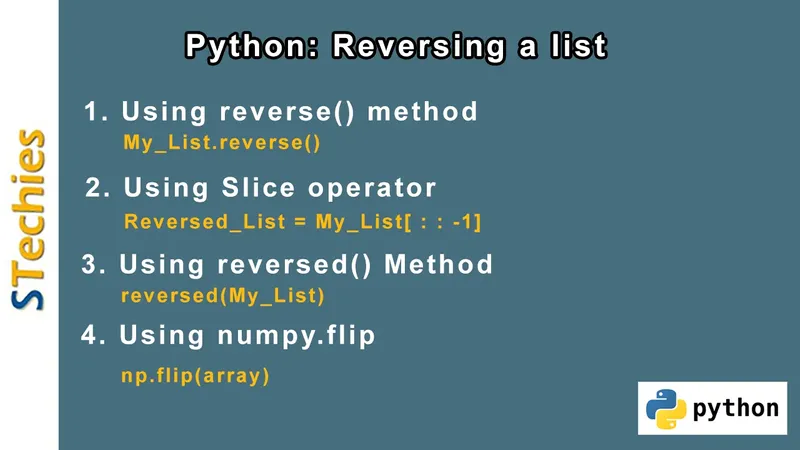
One of the coolest ways to do this in Python involves something called slicing. Don’t let the fancy name scare you. It’s just a clever way of telling Python to grab a piece of your list. And with a tiny, almost cheeky addition, you can tell it to grab it backward!
This slicing magic looks like this: my_list[::-1]. See that double colon and the minus one? That’s the secret handshake. It’s like whispering to Python, "Hey, give me everything, but starting from the end and moving towards the beginning." Pretty neat, huh?
The beauty of this is its simplicity. You don’t need complicated instructions or a lengthy explanation. Just a few characters, and voilà! Your list is doing a delightful somersault. It’s so straightforward, it almost feels like cheating, but in the best possible way.
Let’s say you have a list of numbers: [1, 2, 3, 4, 5]. With [::-1], it instantly becomes [5, 4, 3, 2, 1]. It’s like watching a digital magician pull a rabbit out of a hat, except the rabbit is your original list, now looking brand new and backward.
And it’s not just for numbers! This trick works on lists of words, letters, or any kind of data you can think of. Want to reverse a list of your friends’ names? Python can do it in a snap. It’s a versatile little trick that proves powerful things can come in small packages.

This slicing method is also non-destructive. That means it doesn't actually change your original list. It creates a new list that's the reversed version. So, your precious original data remains safe and sound, while you get to play with its mirrored twin.
Think of it like taking a photograph of a beautiful landscape and then looking at that photograph in a mirror. The landscape is still there, but the reflection offers a different, intriguing view. You haven't altered the real landscape, just observed its reversed image.
This is super handy when you need both the original order and the reversed order for different parts of your program. You can keep the original for one task and use the reversed version for another, without any confusion or accidental overwriting.
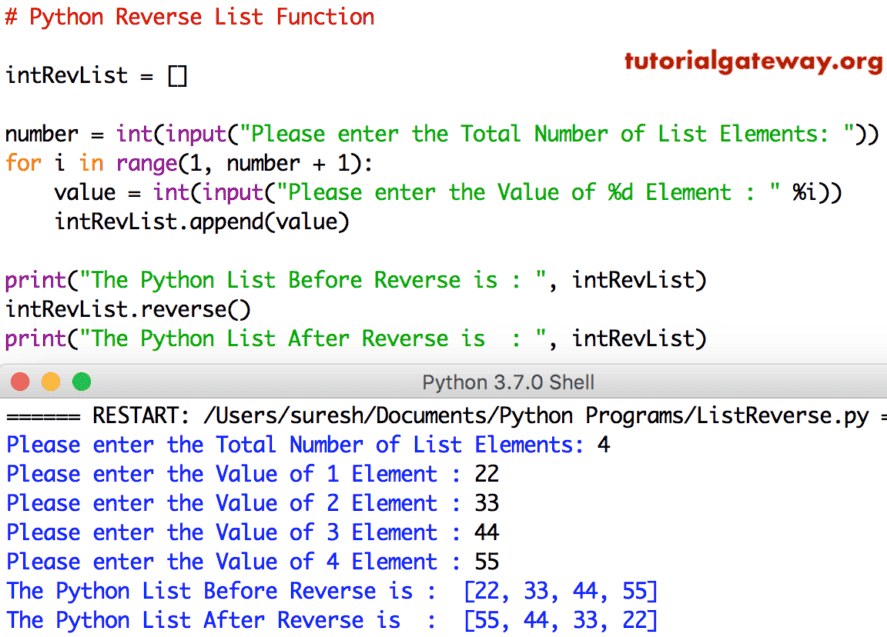
Beyond slicing, there's another delightful method: the .reverse() method. This one is a bit more direct, and dare I say, a tad more dramatic. When you call my_list.reverse(), it directly modifies your existing list.
It’s like telling your list, "Okay, time for a serious makeover! Flip yourself around, right here, right now!" And your list, obediently and with a flourish, reverses itself in place. No new list is created; the original gets a complete transformation.
This is where the "entertaining" part really shines. It’s a direct command, a clear instruction. You’re not asking for a copy; you’re asking for a change. And Python delivers it with admirable efficiency.

Imagine you have a messy collection of socks that you’ve just pulled out of the laundry. You want them all facing the right way for folding. Using .reverse() is like giving them a quick shake and saying, "All you right-facing socks, become left-facing, and vice versa!"
The .reverse() method is often used when you don't need the original order anymore. You just want the reversed version, and you want it to happen immediately. It’s about being decisive and getting the job done without any fuss.
It’s also quite efficient, especially for very large lists, as it doesn’t have to allocate memory for a new list. It just rearranges what's already there. Think of it as tidying up your existing shelf rather than buying a whole new shelf for the reversed items.
There's also a nifty function called reversed(). This one is a bit of a hybrid. It doesn’t modify the original list, and it doesn't immediately give you a list back either. Instead, it gives you a special kind of iterator.
An iterator is like a set of instructions for how to go through something. In this case, it’s instructions on how to go through your list backward, one item at a time. You then usually convert this iterator into a list to see the result.
So, you might write list(reversed(my_list)). The reversed(my_list) part creates the iterator, and then list() takes that iterator and builds a brand-new, reversed list from it. It's a two-step dance, but it's elegant.
This reversed() function is fantastic because it’s very memory-efficient, especially when dealing with huge datasets. You don’t load the entire reversed list into memory at once. You just fetch items as you need them. It’s like sipping a drink one gulp at a time rather than chugging the whole bottle.
It offers a balance between creating a new list (like slicing) and modifying in place (like .reverse()). It’s a versatile option for when you want the flexibility of iterating backward without necessarily needing to store the entire reversed sequence upfront.
The choice between these methods often comes down to what you need to do. Do you need to keep the original? Use slicing or reversed(). Do you want to change the original directly? Use .reverse().
It’s this subtle control and variety that makes working with Python so engaging. It’s not just about getting the job done; it’s about having different, fun ways to achieve the same goal. Each method has its own personality, its own charm.
Think of it like choosing an outfit. You have jeans and a t-shirt for a casual look, a dress for something more formal, or a suit for a special occasion. All are ways to dress, but they serve different purposes and feel different.

This ability to manipulate lists, to turn them inside out, is a fundamental building block in programming. But the way Python allows us to do it, with such ease and elegance, makes it feel less like work and more like play.
It’s the kind of feature that makes you want to experiment. You start with a simple list of numbers, then you try a list of words, then maybe a list of lists! You see how these reversal tricks behave with different types of data, and you learn by doing.
And the feeling of accomplishment when you successfully reverse a list, no matter how simple, is surprisingly rewarding. It's a small win, a little victory that builds your confidence and encourages you to explore more complex programming tasks.
So, next time you’re looking at a list in Python and feel a whimsical urge to see it backward, you know exactly what to do. You have a whole toolkit of fun and effective methods at your fingertips. It’s a simple concept, but the joy of mastering it is anything but.
Whether you’re a seasoned coder or just dipping your toes into the vast ocean of Python, reversing a list is a delightful little adventure. It's a testament to how powerful, yet accessible, this programming language can be. Give it a whirl; you might be surprised at how much fun you have.
"The only way to do great work is to love what you do." — Steve Jobs
And sometimes, loving what you do means finding joy in the simple, elegant act of turning a list on its head. Python makes that easy, and frankly, it’s pretty entertaining.