
How Can I Destroy A Hard Drive

We’ve all been there. That old laptop, a faithful companion through countless late-night study sessions and probably even more Netflix binges, is finally groaning under the weight of its years. Or maybe you’ve upgraded your phone, tablet, or even your gaming rig, and now a perfectly good, but no longer powerful, piece of tech is collecting dust. Before you toss it into the abyss of forgotten gadgets, there’s one crucial step you absolutely need to take: dealing with the hard drive.
Now, before you get visions of Liam Neeson in Taken, dismantling machinery with a rogue fork, this isn't about espionage or extreme measures. This is about ensuring your personal data, your embarrassing search history, your secret recipes for questionable microwave meals, doesn't fall into the wrong hands. Think of it as digital decluttering, but with a much higher stake than just finding mismatched socks.
The Digital Ghost in the Machine
Your hard drive. It's the silent keeper of your digital life. Every photo, every document, every email, every single embarrassing meme you’ve ever downloaded – it all lives there, on those spinning platters or in those solid-state chips. And while a simple delete might seem sufficient, it's really more like hiding a ghost in the attic. It's still there, just out of sight, waiting for someone to stumble upon it.
Must Read
This is why simply throwing away an old hard drive is a big no-no. It's like leaving your diary open on a park bench. In today’s data-driven world, identity theft and data breaches are more prevalent than ever. So, let's talk about how to send those digital ghosts packing, permanently and securely.
Why Bother? The Data Demolition Derby
You might be thinking, "Who would even want my old vacation photos from 2012?" The answer, unfortunately, is anyone. Think about it: your online banking details, your social security number (if you’re in the US), passwords to all your various accounts, personal correspondence, private medical information… the list goes on. Even seemingly innocuous data, when combined with other snippets, can be pieced together to create a surprisingly accurate profile of you.
And it’s not just about malicious actors. Sometimes, even well-meaning data recovery services can access information that you thought was gone forever. So, for your own peace of mind, and to avoid becoming a cautionary tale in a cybersecurity lecture, proper drive destruction is paramount.
Methods of Digital Demolition: From Gentle Erasure to Extreme Makeover
Okay, let’s get down to the nitty-gritty. We’re going to explore various ways to ensure your data is truly gone. We’ll start with the less… violent options and move our way up. Think of it as a spectrum of digital doom.
1. The Software Wipe: The Digital Scrub Brush
This is your entry-level option, best suited for when you want to sell or donate your old device and need to prove it’s been wiped clean. Software wiping essentially overwrites your data multiple times with random information, making it incredibly difficult, if not impossible, to recover.
How it works: You boot up your computer from a special program (often a USB drive) that bypasses your operating system. This program then goes to work, writing over every sector of your hard drive. Popular options include DBAN (Darik's Boot and Nuke) for traditional hard drives, and built-in secure erase functions on many SSDs.
Pros:
- Relatively easy to use.
- Keeps the drive intact for potential reuse (though check compatibility).
- Environmentally friendly (no physical destruction).
Cons:
- Takes a long time. Depending on the size of your drive and the number of overwrites, this can take many hours, even days.
- Less effective for very old or physically damaged drives.
- Not considered the absolute most secure method by hardcore security enthusiasts.
Fun Fact: The concept of overwriting data dates back to the earliest days of computing. Imagine trying to erase a magnetic tape! They literally had to physically rewind and re-record over the old information.
Practical Tip: If you’re opting for a software wipe, start it on a Friday afternoon and let it run over the weekend. Grab a good book, maybe a documentary about the history of data storage (it’s surprisingly fascinating!), and let the digital magic happen.
2. Physical Destruction: The Unplugged Approach
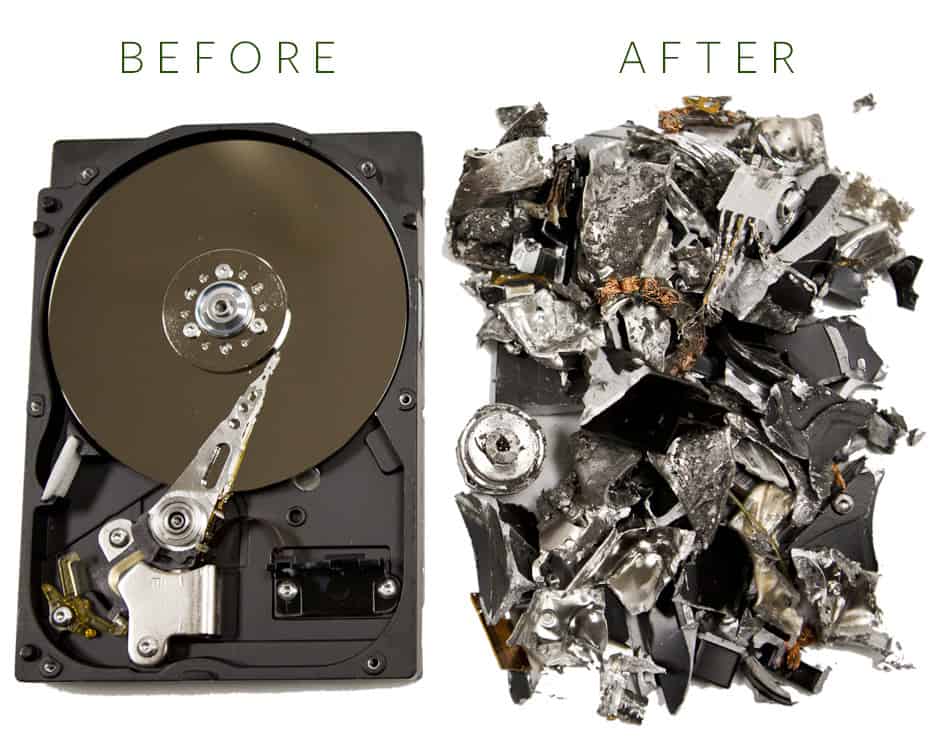
This is where things get a little more hands-on. If software wiping feels like not enough, or if you’re just done with the whole thing and want to ensure absolute finality, physical destruction is the way to go. It’s the digital equivalent of shredding sensitive documents, but on a much more robust scale.
There are a few ways to achieve this:
a) The Drill, Hammer, and Screwdriver Symphony
This is the DIY enthusiast's choice. It's a bit more involved but can be very satisfying. You’ll need some basic tools and a bit of courage.
How it works: First, open up your computer or the external drive enclosure. Locate the hard drive. For traditional spinning drives, you’ll want to expose the platters (those shiny, disk-like things inside). For SSDs, you’ll be looking to damage the memory chips. Then, armed with your tools:

- Drill: Drill multiple holes through the platters of a spinning drive. For SSDs, drill through the circuit board and chips.
- Hammer: Smash the drive. Really go at it. Aim for the platters or the circuit board.
- Screwdriver: Pry open the casing and try to bend or break the platters or chips.
Pros:
- Extremely effective if done correctly.
- Can be a cathartic experience after a long period of dealing with tech issues.
- Very low cost if you already own the tools.
Cons:
- Safety first! Wear safety glasses and gloves. Flying metal shards are no joke.
- Can be messy. Bits of metal and plastic will go everywhere.
- Requires some physical effort.
- You’ll need to dispose of the resulting debris responsibly.
Cultural Reference: Remember those old spy movies where they’d dramatically smash their hard drives with a hammer before fleeing? This is that moment, minus the international intrigue (hopefully!).
Practical Tip: Set up your destruction zone in a well-ventilated area, like a garage or an outdoor space. Lay down a tarp or old newspapers to catch the debris. Think of it as your personal tech shredding ceremony.
b) The Professional Shredding Service: The High-Tech Exterminator
If the thought of wielding a hammer at your electronics gives you the jitters, or if you're dealing with a large volume of drives, professional shredding services are a fantastic option. These companies specialize in secure data destruction.
How it works: You can either drop off your drives at their facility, or in many cases, they offer pick-up services. They use industrial-grade shredders that reduce your hard drive to tiny, unrecoverable fragments. Some services even offer certificates of destruction, which can be useful for businesses needing to comply with data privacy regulations.
Pros:
- The most secure and convenient option.
- No physical effort or mess for you.
- Provides peace of mind, especially for sensitive data.
- Often environmentally responsible, as they recycle the shredded materials.

Cons:
- Can be more expensive than DIY methods.
- Requires finding a reputable service.
Fun Fact: Some industrial shredders can process hundreds of hard drives per hour. Imagine the sheer volume of digital history that gets permanently erased every single day!
Practical Tip: Do your research! Look for services with good reviews and certifications like NAID AAA. Ask about their process and what happens to the shredded materials.
3. The Data Destruction Device: The Specialized Tool
For the ultimate in home destruction, or for IT departments, there are specialized data destruction devices. These range from powerful degaussers (which essentially scramble the magnetic fields on traditional drives) to benchtop shredders designed for electronics.
How it works: Degaussers create a powerful magnetic field that erases all magnetic data from a hard drive. Benchtop shredders physically break down the drive into small pieces. These are typically more expensive but offer a high level of control and security.
Pros:
- Extremely effective and secure.
- Can be used repeatedly for multiple drives.
Cons:
- Can be very expensive.
- Requires some technical knowledge to operate correctly.
- Degaussers only work on traditional magnetic hard drives, not SSDs.

Cultural Reference: Think of these devices as the "Bat-gadgets" of data destruction. Powerful, specialized, and designed for a very specific, albeit less glamorous, mission.
Practical Tip: If you’re considering investing in one of these, make sure it’s appropriate for the types of drives you have (HDD vs. SSD) and that you understand its operation thoroughly.
What About SSDs? The Solid-State Shuffle
It’s worth noting that Solid State Drives (SSDs) are a bit different from traditional Hard Disk Drives (HDDs). Because they don’t have spinning platters, degaussing doesn't work on them. For SSDs, physical destruction of the memory chips is the most reliable method. Software wiping is also effective, but it’s crucial to use a method specifically designed for SSDs, as they handle data differently than HDDs. Many modern SSDs have built-in Secure Erase commands that are highly effective.
Fun Fact: SSDs store data on NAND flash memory chips, which are essentially a grid of transistors. When you "delete" data, the controller just marks those cells as available, but the data itself can often be recovered until it's overwritten.
A Final Thought: The Art of Letting Go
As we navigate our increasingly digital lives, the ability to securely let go of old technology is becoming as important as the ability to acquire new gadgets. It’s a small act of responsibility that has a significant impact. Think of it as a digital detox, a way to streamline not just your physical space, but your online presence as well.
This process of securely destroying a hard drive, whether through meticulous software scrubbing or a satisfyingly cathartic hammer blow, is a reminder that our digital footprints are real. By taking these steps, we’re not just protecting ourselves from potential threats; we’re practicing a mindful approach to our data, acknowledging its value, and ensuring it doesn't outlive its welcome.
So, the next time an old tech companion is ready for retirement, don’t just shuffle it to the back of the closet. Give it a dignified, and secure, digital send-off. Your future self, and your peace of mind, will thank you for it.

