How To Send A Cv Via Email
Ever feel a flutter of excitement, maybe a touch of nerves, when a new job opportunity pops up? It’s like finding a hidden gem, a chance for a fresh start or a new adventure. And guess what? One of the most common ways you’ll get to present yourself for these exciting prospects is by sending your CV (or resume, as it’s often called) via email. Think of it as your personal digital handshake, a way to introduce your skills and experience to the world, all from the comfort of your keyboard. Learning this simple skill isn't just practical; it’s a gateway to countless possibilities, and honestly, it can be surprisingly satisfying to master.
So, what's the big deal about sending a CV via email? Well, its primary purpose is to create a professional and accessible way to share your qualifications with potential employers, recruiters, or even academic institutions. The benefits are huge! It’s fast, efficient, and allows you to reach a wider audience than ever before. Gone are the days of printing hundreds of copies and mailing them out. Email lets you send your information instantly, anywhere in the world. Plus, it allows you to tailor your message with a personalized cover email, making your application stand out from the crowd.
You might be surprised at how often this skill comes into play, even beyond the typical job search. For instance, if you’re applying for a scholarship or a place on a postgraduate program, you'll likely be asked to submit your CV electronically. Even in your daily life, if you're volunteering for a project or looking to join a community group that requires a bit of background on your experience, an email with your CV attached can be the perfect solution. Imagine wanting to join a local historical society and being able to share your research experience with them instantly – it’s that simple!
Must Read
Now, let’s get practical. Sending a CV via email is far from rocket science. Here are some simple tips to make sure you’re doing it right. First, always save your CV as a PDF. This ensures that your formatting stays intact, no matter what device or software the recipient uses to open it. Think of it as a perfectly preserved digital document. Next, give your CV file a clear and professional name, like "FirstName_LastName_CV.pdf." This helps the recipient easily identify your document. When it comes to the email itself, use a clear and concise subject line, such as "Job Application - [Your Name] - [Job Title]" or "CV Submission for [Role Name]." This is crucial for ensuring your email gets noticed and sorted correctly.
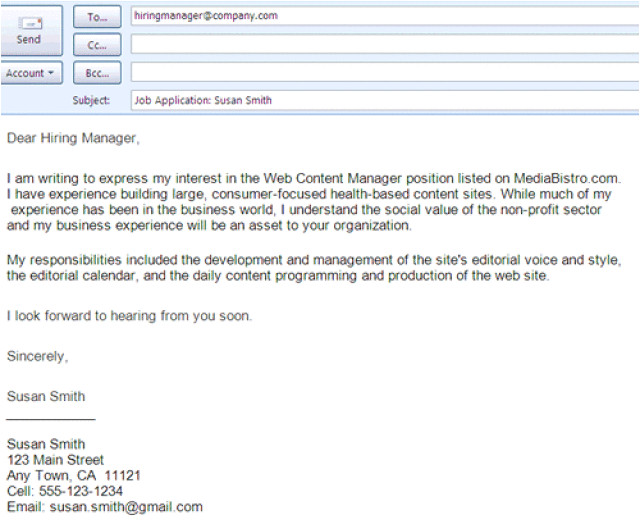
For your email body, keep it brief and to the point. Introduce yourself, mention the position you’re applying for, and briefly highlight why you’re a good fit. Then, clearly state that your CV is attached for their review. Proofread everything meticulously – typos and grammatical errors can be a deal-breaker. Don't be afraid to explore! You can find plenty of online resources and tutorials demonstrating the best practices for crafting a compelling cover email. Practice sending a test email to yourself or a friend to get comfortable with the process. It’s a small skill that can unlock big opportunities, so dive in and see where it takes you!


.jpg)