
How To Hook Up A Wireless Mouse

Remember the days of the trusty old ball mouse? Those clunky companions that left little grey streaks on your desk and occasionally got stuck on a rogue crumb? It feels like a distant memory, doesn't it? We’ve traded those desk-bound buddies for something a little more… liberated. And the journey from tethered to untethered is, dare I say, a little bit magical.
Think about it. You’ve just unboxed your shiny new wireless mouse. It’s sleek, probably ergonomic, and practically begging to explore your desk with newfound freedom. No more wrestling with a cord that’s always too short, or getting tangled up like a Christmas tree. This is freedom, people!
So, how do we unleash this digital darling? It’s surprisingly simple, a bit like introducing a new pet into your home. First things first, let's talk about its power source. Most wireless mice run on batteries. Think of them as tiny energy snacks that keep our little pointer friend happy and responsive.
Must Read
The Tiny Heartbeat: Batteries
You’ll usually find a little compartment on the underside of your mouse. It might have a tiny latch or a sliding cover. Pop it open, and there you'll see the slots for your batteries. They’re typically standard AA or AAA sizes, the same ones you might use for your TV remote or a kid’s toy.
Make sure you pop them in the right way. There are little plus and minus signs inside the compartment to guide you. It’s like giving your mouse a perfectly balanced hug. Get it wrong, and it’s like trying to hug a porcupine – a bit awkward and unlikely to get the desired result.
Once the batteries are in, gently close the compartment. You might even hear a little click, a satisfying sound that says, "We're ready!" It’s the sound of anticipation, of potential unleashed.
The Secret Handshake: The Dongle
Now, for the magic wand. Most wireless mice come with a tiny USB receiver, often called a dongle. This little guy is the bridge between your mouse and your computer. It’s the silent communicator, the one who translates your hand movements into digital commands.
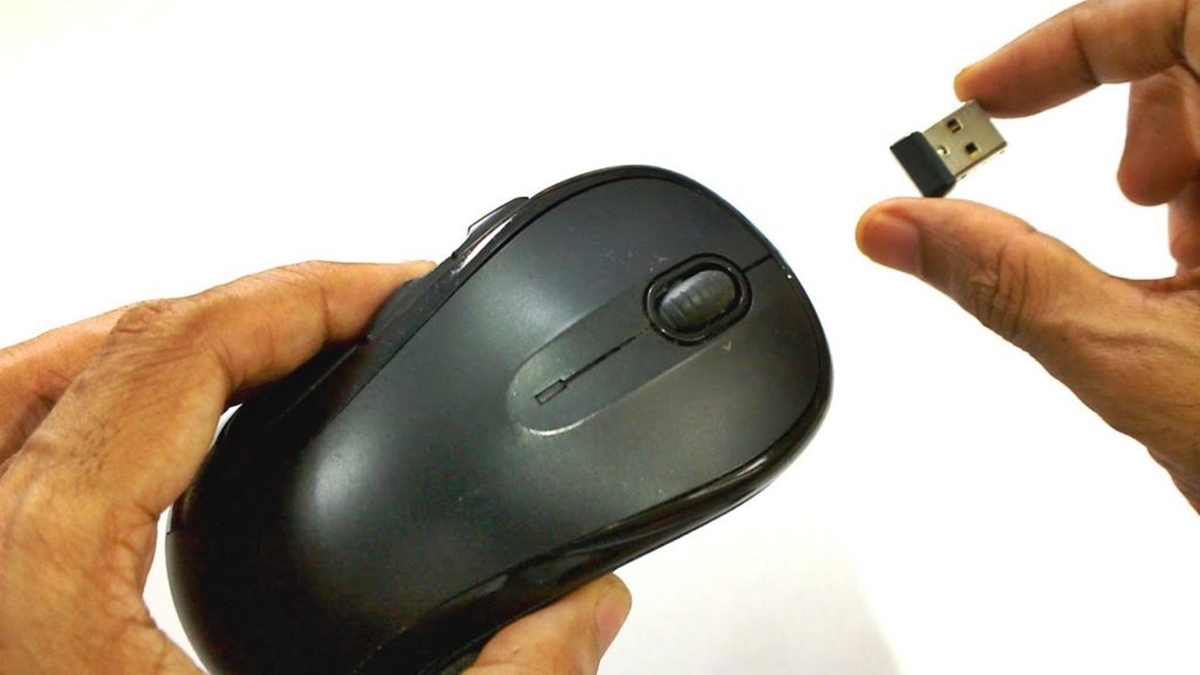
Find an available USB port on your computer. They’re those rectangular slots that are pretty much everywhere these days. Think of them as little doors that open up new possibilities for your technology.
Gently plug the dongle into one of these ports. It should fit snugly, no forcing required. If it feels like you’re trying to jam a square peg into a round hole, you’re probably doing it wrong. Take a breath, re-evaluate, and try again.
Sometimes, this little dongle has its own special home on the mouse itself, usually nestled away when not in use. It’s like a built-in security blanket, ensuring it doesn’t get lost in the abyss of your desk drawer.
The Moment of Truth: Power On!
With the batteries in and the dongle plugged in, it’s time for the grand reveal. Most wireless mice have a little power switch, often on the underside. Flip it to the ‘on’ position. You might see a tiny LED light blink to life, a little signal that your mouse is awake and ready to play.

Your computer, bless its intelligent heart, will usually recognize the dongle almost instantly. You might see a little notification pop up, something along the lines of “Installing device driver.” This is your computer learning your mouse’s name and personality.
It’s a bit like meeting someone for the first time. Your computer is saying, “Ah, a new friend! Let me learn how to communicate with you.” And just like that, with a few electronic handshakes, you’re connected.
A Dance of Freedom
And then, it happens. You move the mouse. And on your screen, a tiny arrow, your faithful cursor, glides across the display. It’s a moment of quiet triumph. No wires holding you back, just the smooth, effortless flow of your intentions translated into action.
Imagine your mouse as a little explorer, charting new territories on your screen. It can roam freely, unburdened by the shackles of its wired past. This freedom allows for a more natural, comfortable experience, especially during those marathon work sessions or intense gaming marathons.

It’s this simple act of connection that can bring a surprising amount of joy. It's the feeling of upgrading, of making your digital life a little bit smoother, a little bit more elegant. It’s the small victories that make life sweeter, isn’t it?
Troubleshooting: When Love Gets Tricky
Now, sometimes, even in the simplest of unions, there can be hiccups. What if your cursor is acting like it’s had too much coffee, jumping around erratically? Or perhaps it’s just not moving at all, a silent protest against its digital existence?
Don't despair! Most of the time, these are easily solvable. First, double-check those batteries. Are they fresh? Are they in the right way? Sometimes, a little jiggle can work wonders. It's the digital equivalent of a stern but loving tap.
Next, try unplugging and re-plugging the dongle. It’s like restarting a conversation. Sometimes, a fresh connection is all that’s needed. Make sure there’s nothing physically obstructing the signal between your mouse and the dongle, like a misplaced coffee mug or a stack of important documents.
If all else fails, consult your mouse’s manual. It’s that often-ignored booklet that holds the wisdom of the ages, or at least the specific instructions for your particular model. It’s the fairy godmother of troubleshooting, ready to grant your wish for a working mouse.
The Unexpected Perks
Beyond the obvious freedom, there are other delightful surprises. Think about how much cleaner your desk looks. No more cable clutter, no more tripping hazards. It’s a minimalist dream come true, a serene digital landscape.
And for those who enjoy a bit of flair, many wireless mice come in an array of vibrant colors and designs. They can be an extension of your personality, a stylish accessory that complements your workspace. It’s not just a tool; it's a statement.
There's also a subtle sense of empowerment. You've taken a piece of technology that was once bound and given it wings. It’s a small act of liberation that can make your daily digital interactions feel a little bit more seamless, a little bit more enjoyable. So, next time you click and scroll with your wireless mouse, take a moment to appreciate the simple, elegant magic at your fingertips.

