How Many Keys Are In A Keyboard
Ever just stared at your keyboard? You know, that trusty sidekick for all your digital adventures? You type on it all day. But have you ever stopped to wonder... just how many keys are actually on there? It’s a question that pops into your head at weird times, right? Like when you’re waiting for a download, or maybe even mid-sentence during a frantic email. It’s a surprisingly fun rabbit hole to go down.
Let’s get this out of the way. There isn’t one single answer. Nope. It’s not like counting fingers on a hand. It’s way more… interesting. Think of it like asking how many flavors of ice cream exist. Lots! And keyboards are kind of the same. It depends on a few things.
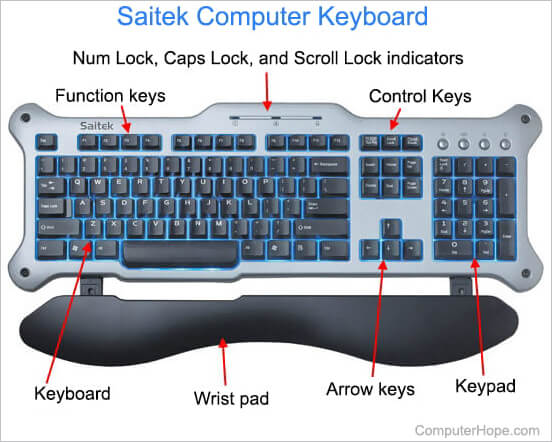
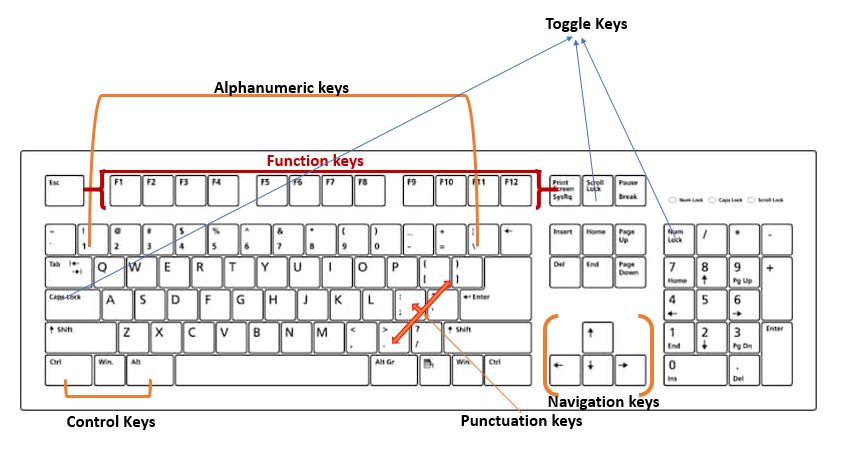
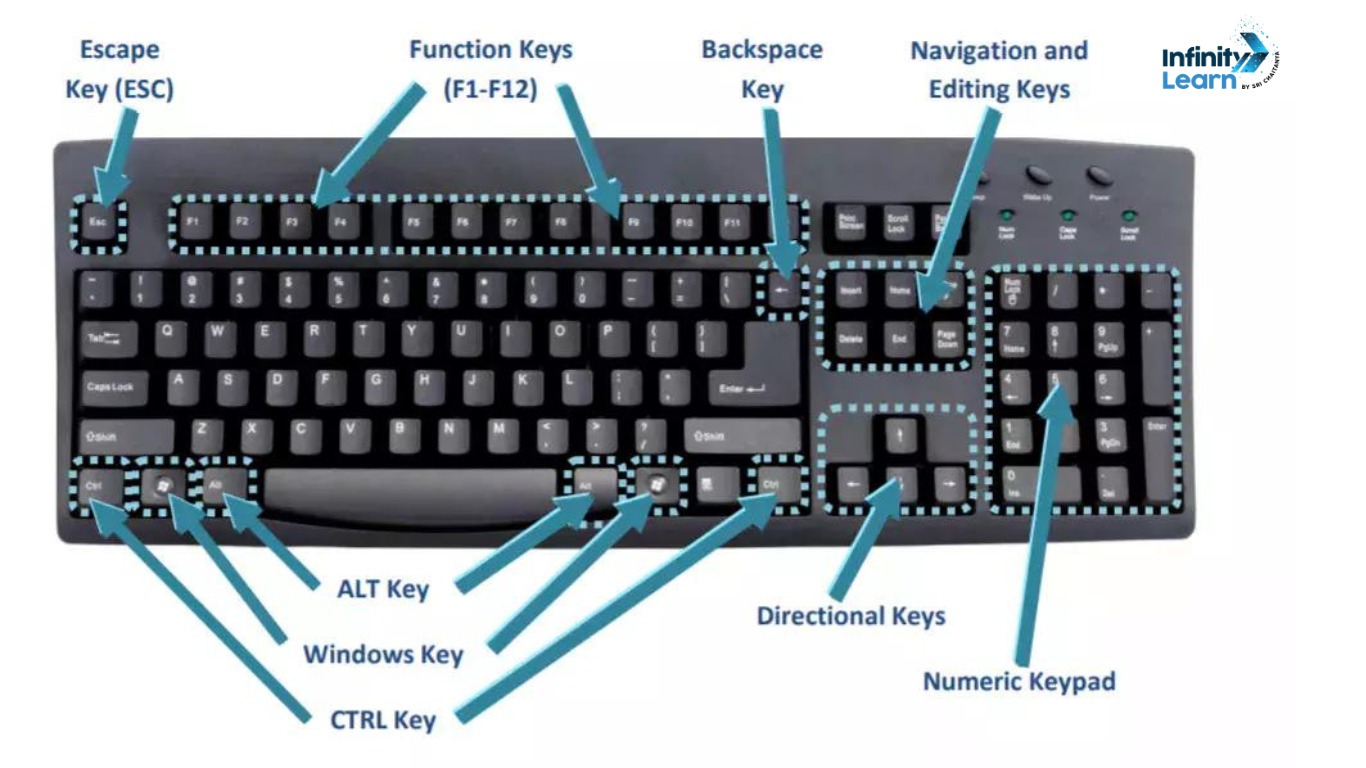
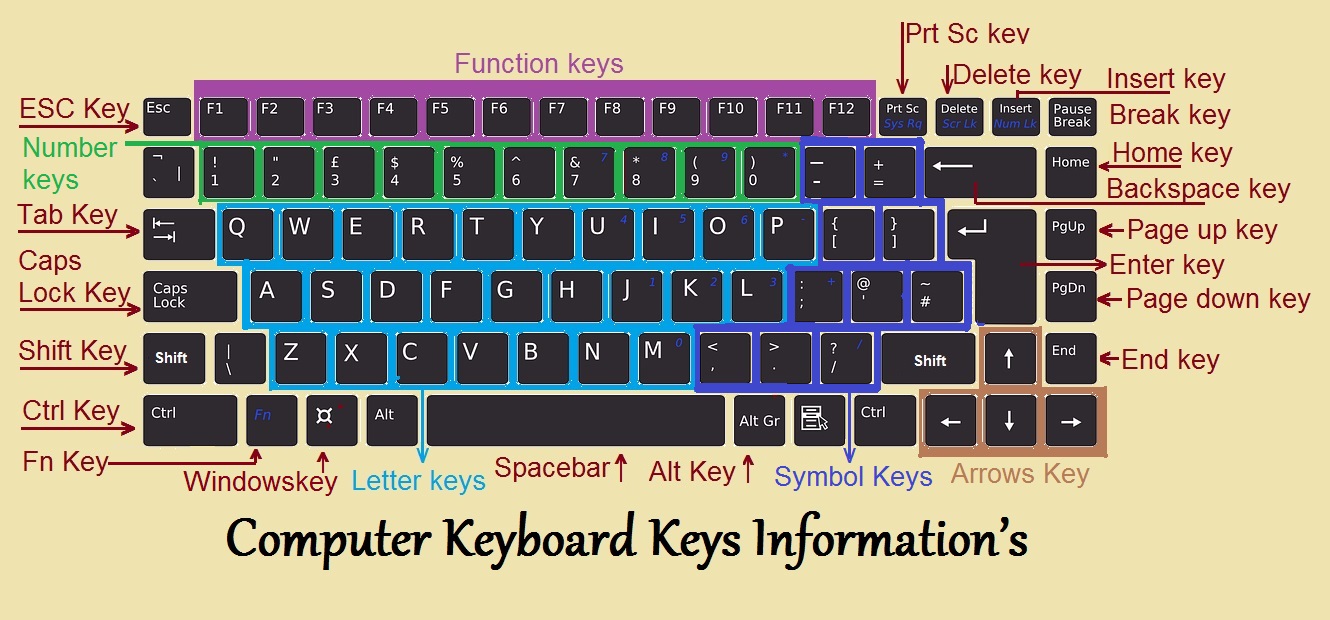
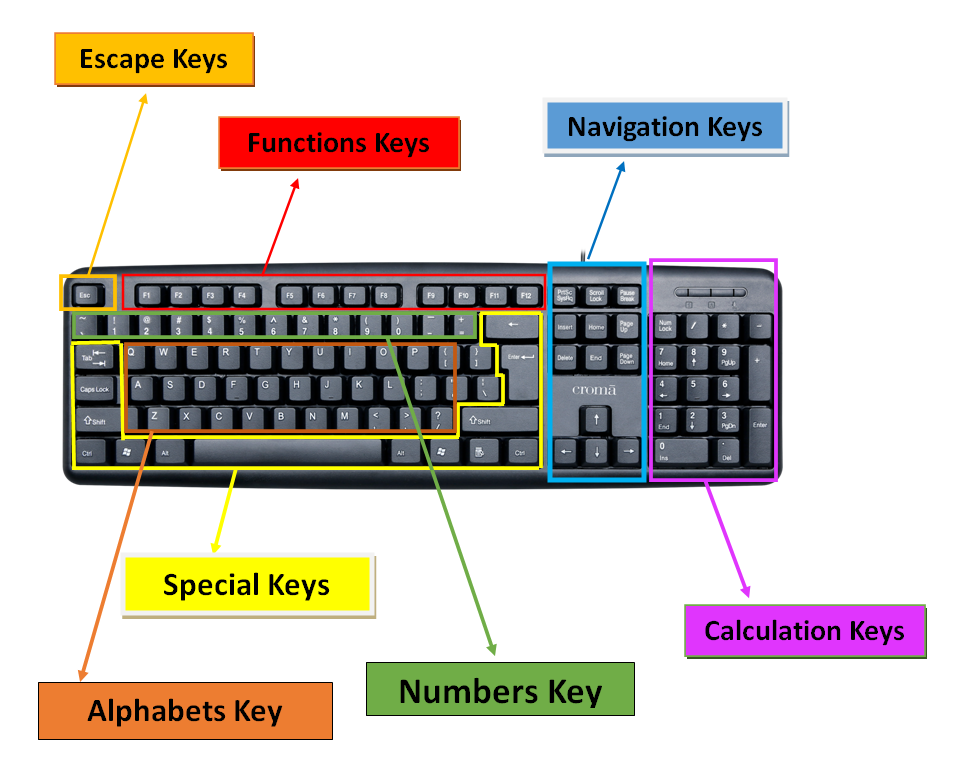
The most common culprit you'll find lurking on desks worldwide is the standard full-size keyboard. This is your classic, no-nonsense layout. It’s got the alphabet, the numbers, all the punctuation you could ever dream of. Plus, those handy function keys at the top – F1, F2, all the way to F12.
Must Read
And don't forget the number pad on the side! You know, the one you might use for serious spreadsheet work, or perhaps for entering that secret PIN that’s still your birthday. That number pad adds a good chunk of keys, usually around 17 or so. So, for a typical full-size board, we’re usually looking at around 104 keys. Some might sneak in an extra one or two for media controls or other shortcuts.
But wait, there’s more! What about those fancy keyboards? The ones that look like they belong in a sci-fi movie? Those often have a few more tricks up their sleeve.
Then you have the tenkeyless (TKL) keyboards. These are for people who are done with that side number pad. They say, "I don't need it! It just takes up space!" And they’re right. They’re smaller, more compact. Great for saving desk real estate or for streamers who want more room for their epic gaming reactions.

So, if you take away that number pad, you’re looking at roughly 87 keys for a TKL. A good chunk of keys removed, but still plenty to get the job done. It’s a minimalist approach, you could say. Or maybe just… efficient.
And the fun doesn't stop there. We're just scratching the surface. Ever seen a compact or 60% keyboard? These guys are tiny! They pack everything you need, but cleverly hide a lot of the less-used keys behind function layers. It’s like a magic trick.
A 60% keyboard usually strips out not just the number pad, but also the navigation cluster (the arrow keys, Home, End, Page Up, Page Down) and the function row. You have to press a special 'Fn' key in combination with others to access these. So you might find yourself looking at something closer to 61 keys. It’s a commitment! But for some, the sheer portability and desk space savings are totally worth it.
Think about it. You're using a combination of keys. It's like playing a mini-piano, but with letters and symbols. A 60% keyboard user is a true keyboard ninja. They’ve mastered the layers. They probably have an extra pinky finger developed. Or maybe just really good muscle memory.
What about those really specialized keyboards? Like for gamers? They often have extra keys! These might be for macros – those super handy shortcuts that do a bunch of things at once. So a gaming keyboard could easily have 108, 110, or even more. They’re built for speed and for doing more with less effort. More buttons mean more power, right?
And then there are the truly exotic ones. The ergonomic keyboards that split in half. The ones with rotary encoders for scrolling. Some mechanical keyboards can be heavily customized, and people might even build their own with weird key counts. You could theoretically design a keyboard with 50 keys or 150 keys. The possibilities are… a bit overwhelming.
Let's not forget about the layout. QWERTY is king, of course. But have you heard of Dvorak? Or Colemak? These are alternative keyboard layouts designed to be more efficient or ergonomic. They have the same number of keys, but the letters are in different places. It’s a whole other level of keyboard obsession.
Imagine learning a whole new way to type. It’s like trying to write with your non-dominant hand. Initially, it’s going to be slow. Frustrating, even. But some people swear by it. They say their fingers dance across the keys with newfound grace. And fewer typos! Who wouldn’t want fewer typos?

And then there are the symbols. The punctuation. The less-used keys. That little tilde `~` key. The backtick. The grave accent. They all have a home. And when you add up all those little guys, plus the modifier keys (Shift, Ctrl, Alt, Win/Cmd), the number starts to creep up.
It’s the modifier keys that really add to the complexity, isn't it? You have two Shift keys. Two Ctrl keys. Two Alt keys. And a Windows key or a Command key. These aren't just single characters. They’re like special operators. They change the meaning of everything else.
So, when you’re counting, are you counting every single little button? Or just the ones that produce a letter or a number? This is where the definition gets blurry. Most people, when they say "104 keys," are including all those standard alphanumeric and symbol keys, plus the function keys and the numeric keypad.
But what about the 'Print Screen', 'Scroll Lock', and 'Pause Break' keys? They're often found at the top, just past the function keys. They have their own little niche. Do they count? Most standard counts do include them. They’re part of the established order.
It’s like a secret society of keys. They all have their purpose, even the ones you rarely touch. And the beauty is, you don't need to know the exact count. You just need to know that it's enough to get your cat memes typed, your code written, and your epic online arguments fueled.
The number of keys isn't a rigid rule. It’s a spectrum. A delightful range of options for every type of typist. From the minimalist gamer to the spreadsheet wizard, there’s a keyboard out there with just the right number of keys.
And the really cool part? Keyboard technology is always evolving. We’re seeing more split designs, more customizable layouts, and even keyboards with built-in trackpads. The number of keys, and their arrangement, will probably keep changing. It’s a moving target!
So, next time you’re typing, take a moment. Glance down. Appreciate the sheer number of little buttons at your fingertips. They’re more than just plastic squares. They’re portals. They’re tools. They're the foundation of our digital lives. And the exact number? Well, that’s part of the fun mystery. It’s enough to make you wonder, isn't it? Enough to spark a little curiosity about the humble keyboard. And that's pretty neat.