Why Is My Wordpress Site So Slow

Hey there, fellow website wranglers! So, your WordPress site is moving slower than a sloth on a Sunday afternoon, huh? Don't you worry your pretty little head about it. We've all been there. You spent hours crafting the perfect blog post, agonized over the ideal image placement, and then… BAM! Your site loads like it's wading through molasses. It's enough to make you want to throw your laptop out the window, or at least dramatically sigh and stare at the ceiling for a good five minutes. But fear not, my friend, because your trusty (and slightly sarcastic) guide is here to help you figure out why your WordPress site is throwing a digital siesta and how to wake it up!
Think of your WordPress site like a fancy restaurant. When it's running smoothly, people are happy, ordering more, and leaving great reviews. But when things get sluggish, your "customers" (aka your visitors) get impatient. They'll tap their fingers, check their watches, and eventually wander off to that other restaurant down the street that serves up lightning-fast service. And nobody wants that, right? We want our websites to be bustling hubs of activity, not empty ghost towns!
So, let's dive into the nitty-gritty. Why is your digital darling dragging its heels? It's usually not just one thing, but a few culprits working together like a mischievous band of gremlins. Let's expose these speed demons!
Must Read
The Usual Suspects: What's Making My Site So Sluggish?
Imagine your website as a carefully constructed LEGO castle. Now, imagine a bunch of toddlers have been let loose in the room. Things are going to get a bit messy, and the castle might start to wobble. Your WordPress site is no different. It's made up of themes, plugins, images, and code, all working in harmony. When one of those elements gets a bit… overenthusiastic, the whole thing can slow down.
1. Your Plugins: The "Feature Creep" Epidemic
Ah, plugins. The siren song of WordPress. "Ooh, a new feature! I need that!" you exclaim, happily clicking "install." But here's the thing, my friend: every single plugin you install adds a little bit of code, a little bit of processing power, and a little bit of potential bloat. It's like adding extra ingredients to a recipe – sometimes it's brilliant, and sometimes you end up with something… less than ideal.
Some plugins are like that one friend who always has to one-up everyone. They might be packed with features you don't even use, running scripts in the background that you're blissfully unaware of. Think of a plugin that adds 50 different animation options when you only wanted a subtle fade. That's a lot of unnecessary baggage!
The Solution? Be a plugin minimalist. Honestly, ask yourself: "Do I really need this plugin?" If the answer is a hesitant "maybe," or "it's kinda cool," then it's probably time to say goodbye. Regularly audit your plugins. Deactivate and delete any that are no longer serving a purpose. It's a digital declutter, and your site will thank you for it.
And for goodness sake, only install plugins from reputable sources. Those free plugins with a million five-star reviews might seem great, but a dodgy one can be a secret speed killer. Read the reviews carefully, check the last updated date (an old plugin might not be optimized for the latest WordPress versions), and if something feels off, trust your gut. It's better to be safe and speedy than sorry and sluggish.
2. Your Theme: The Overdressed Diva
Your theme is the outfit your website wears. And just like some outfits, some themes are way too much. We're talking about those super-fancy, feature-rich, "do-everything" themes that promise the moon and the stars. While they might look gorgeous on the demo site, they often come with a hefty dose of code that can weigh your site down like a rock.
Think of it like wearing a ballgown to go grocery shopping. It's beautiful, but it's also impractical and probably gets in the way. Similarly, a theme loaded with parallax scrolling, endless customization options, and built-in page builders that you're not even using can create a lot of unnecessary code that your browser has to process.

The Solution? Keep it simple, stupid (KISS)! Seriously, a lightweight, well-coded theme is your best friend. Look for themes that are specifically designed for speed and performance. Popular choices like Astra, GeneratePress, and Kadence are fantastic for this. They offer a great balance of customization and speed.
And if you're using a theme that's a few years old and hasn't been updated in a while, it might be time to consider a refresh. Outdated themes can be a breeding ground for security vulnerabilities and slow loading times. It might feel like a drag to switch, but think of it as an upgrade to a sports car from a clunky old van. Your site will feel the difference.
3. Images: The Size-Challenged Stragglers
Oh, images. The beautiful, visual spice of your website. But let's be honest, we're all guilty of uploading that massive, uncompressed, glorious high-resolution photo straight from our fancy cameras. And then we wonder why our site is slower than dial-up internet.
Imagine trying to carry a suitcase full of bricks up a flight of stairs. That's what your website is doing every time someone tries to load a page with a huge, unoptimized image. Browsers have to download all that data, and if there's a lot of it, well, you guessed it: snail's pace.
The Solution? Optimize your images like your life depends on it! Before you upload any image, resize it to the dimensions you actually need. If you need a thumbnail, don't upload a giant billboard-sized image and then shrink it in WordPress. Use an image editing tool (even free ones like Paint.net or GIMP will do) or an online compressor to shrink the file size without sacrificing too much quality.
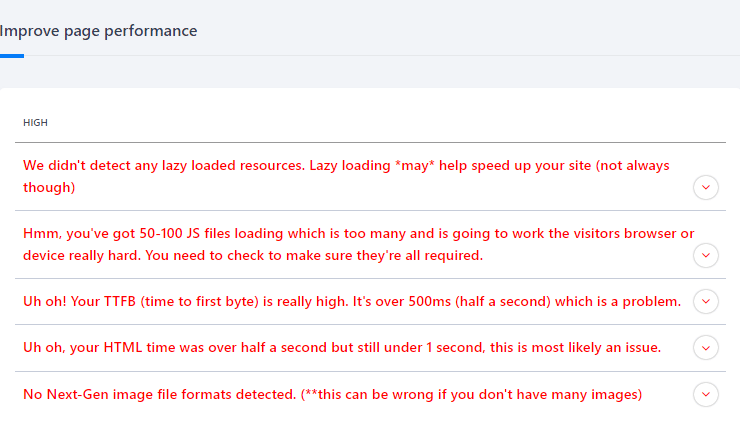
There are also fantastic WordPress plugins like Smush or Imagify that can automatically compress your images for you. It's like having a little image-butler who makes sure everything is perfectly sized and ready to go. And if you're feeling fancy, consider using next-gen image formats like WebP, which offer better compression. Your visitors (and your Google rankings) will thank you!
4. Hosting: The Foundation of Your Digital Empire
Your web hosting is the land your digital empire is built on. If you've got shoddy land, your empire is going to be… well, shaky and slow. Think of cheap, shared hosting as living in a tiny apartment with 50 other people. Everyone's vying for the same resources, and things are bound to get chaotic and slow.
If you're on a super budget-friendly hosting plan, you're likely sharing server resources with tons of other websites. When those other sites get busy, your site can get throttled. It's like being stuck in traffic because someone else is having a parade.

The Solution? Invest in decent hosting. I know, I know, it sounds like a big step, but good hosting is paramount. Look for hosts that offer SSD storage (super-fast data access) and plenty of RAM and CPU power for your website. Consider a step up from basic shared hosting, perhaps a managed WordPress hosting plan or even a VPS (Virtual Private Server) if your site is getting a lot of traffic.
Don't be afraid to do your research and read reviews. A slightly more expensive hosting plan can save you a world of frustration (and lost visitors) in the long run. Think of it as buying a faster car to get to your important destinations – it's worth the investment.
5. Too Many Database Queries: The Information Overload
Your WordPress database is like a massive library. Every time someone visits your site, your server has to go to this library, find all the information it needs (posts, pages, comments, settings, etc.), and then assemble it into a readable page for your visitor. If your server has to make too many trips to the library for each visitor, things start to get slow.
This can happen for a number of reasons, including using plugins that are poorly coded or that generate a lot of extra data. Think of it as having a librarian who has to go to 20 different shelves for every single book request. Not efficient, right?
The Solution? Optimize your database and keep it lean. Regularly clean up your database. This includes things like deleting old post revisions, spam comments, and transient options. There are plugins like WP-Optimize or Advanced Database Cleaner that can help you do this safely and easily.
Also, caching is your best friend here! Caching plugins (more on that next) create static versions of your pages, so your server doesn't have to query the database every single time. It's like having a shortcut to the information, making the whole process much faster.
Speeding Things Up: Your Website's Wake-Up Call!
Okay, so we've identified the potential culprits. Now, let's talk about the magic potions and secret handshakes that will get your site moving at lightning speed. These are the things you can implement right now to give your website a much-needed caffeine boost.
1. Caching: The Secret Stash of Speedy Pages
This is probably the single biggest thing you can do to speed up your WordPress site. Caching is like creating pre-made copies of your website pages. When a visitor comes to your site, instead of generating the page from scratch every single time (which involves all those database queries we talked about), your server serves up a pre-made copy. Much faster!
There are some fantastic caching plugins available. WP Super Cache, W3 Total Cache, and WP Rocket (a premium but incredibly effective option) are all excellent choices. They're relatively easy to set up, and the performance boost is usually dramatic. It's like going from walking everywhere to having a teleportation device.
The Solution? Install a caching plugin and configure it properly. Spend a little time reading the plugin's documentation. Most will have pretty straightforward settings, and once they're set up, they work their magic in the background. You'll be amazed at the difference!
2. Content Delivery Network (CDN): Your Global Speed Booster
Imagine you have a popular ice cream shop. If you only have one location, people who live far away will have to travel a long way to get their delicious scoops. But if you open up franchise locations all over the world, people can get their ice cream much faster, no matter where they are.
A CDN works similarly for your website. It's a network of servers distributed all over the world. When someone visits your website, the CDN delivers your site's content from the server that's geographically closest to them. This significantly reduces latency and speeds up loading times for everyone, especially for international visitors.
The Solution? Sign up for a CDN service. Popular options include Cloudflare (which has a very generous free plan!), KeyCDN, and StackPath. Integrating them with your WordPress site is usually quite simple, and the benefits for global audiences are immense. Your site will feel like it's right next door to everyone!
3. PHP Version: The Engine Upgrade
PHP is the programming language that WordPress is built on. Just like software on your computer, PHP gets updated with new versions that are faster, more secure, and more efficient. Running your site on an older version of PHP is like driving a car with a carburetor when everyone else is using fuel injection. It's just… slower.
Most good web hosts will allow you to easily switch to the latest stable version of PHP through your hosting control panel. It's usually a simple dropdown selection.

The Solution? Ensure you're running the latest stable PHP version. Check with your web host if you're unsure how to do this. It's a quick win that can have a noticeable impact on your site's speed. Just make sure to back up your site before making the change, as there's always a tiny chance of a compatibility issue (though it's rare with stable versions).
4. Lazy Loading: The "See It When You Need It" Trick
Lazy loading is a clever technique where images and videos on your website only load when they become visible in the user's browser window. So, instead of downloading all the images on a long page as soon as someone lands on it, they only load as the user scrolls down.
Think of it like a waiter who only brings you your food when you're ready to eat it, rather than piling everything on your table at once. It makes the initial page load much, much faster, which is great for keeping impatient visitors happy.
The Solution? Enable lazy loading. WordPress has built-in lazy loading for images since version 5.5. You can also find options for this in many caching plugins or dedicated lazy loading plugins. It's a simple but effective way to improve perceived performance.
The Grand Finale: A Speedy Site and a Smiling You!
So there you have it, my friend! Your WordPress site's slowness is likely a combination of a few factors, but the good news is, you have the power to fix it. It might seem a little daunting at first, like trying to untangle a massive ball of yarn, but one step at a time, you'll get there.
Start with the low-hanging fruit: optimize your images, audit your plugins, and install a caching plugin. These alone can make a world of difference. Then, gradually work your way through the other suggestions.
Remember, a fast website isn't just about pleasing search engines; it's about creating a positive and enjoyable experience for your visitors. When your site loads quickly, people are more likely to stick around, explore your content, and engage with what you have to offer. They'll leave with a smile, just like you'll be smiling when you see your site blazing fast!
So go forth, digital warrior! Tackle those speed demons, implement these tips, and watch your WordPress site transform from a sluggish snail into a high-speed bullet train. You've got this, and soon, your website will be performing so well, you'll be tempted to give it a standing ovation. Happy optimizing!