Ah, the humble email. It's how we get our questions answered, our assignments submitted, and our academic lives generally managed. But let's be honest, there's one part that can feel like navigating a minefield: the ending. Yep, we're talking about how to sign off your email to your professor. It’s a tiny detail, but it can say a lot.
Think of it like this: your email is a little package of thoughts and requests. The greeting is the ribbon, the body is the gift, and the closing? That's the tag. You want that tag to be just right. Too casual, and you might seem disrespectful. Too formal, and you might come across as stiff. It's a delicate dance, and thankfully, it's not as complicated as it sounds!
Why is this so entertaining, you ask? Because it’s a universal experience! Every student, at some point, has stared at their screen, cursor blinking, wondering, "What should I write here?" It’s a small moment of mild panic that we’ve all shared. And when you crack the code, it feels like a tiny victory!
This isn't about grand pronouncements or earth-shattering revelations. It's about mastering the art of the polite sign-off. It’s about showing your professor you're a thoughtful and considerate individual, even in the digital realm. And that, my friends, is rather special.
The "It's Been a Pleasure" Dance
Let's start with the classics, the tried-and-true closings that have probably graced countless emails. One of the most popular is the good old "Sincerely." It's a solid choice. It’s polite, it's professional, and it always lands well. Think of it as the comfortable pair of jeans in your email wardrobe. Reliable and always appropriate.
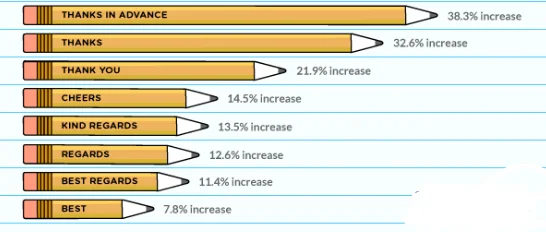
Then there's "Regards." This one is a bit more concise, a touch more business-like. It works perfectly when you've had a straightforward exchange, like confirming a meeting time or asking a quick question. It’s like a firm handshake, brief and to the point, but still friendly.
And let's not forget "Best regards." This adds a little extra warmth to the "Regards." It’s like adding a slight smile to that handshake. It suggests a friendly connection without being overly familiar. It's a great all-rounder, really.
Now, what about the really common one: "Thanks." While it’s great to express gratitude, using just "Thanks" as your closing can sometimes feel a tad abrupt. It’s like saying "cheers" without any context. It’s better to be a bit more specific with your thanks, or to pair it with a more formal closing.
Instead of just "Thanks," consider "Thank you for your time." This is excellent when you've asked for something that requires your professor’s attention, like feedback on a paper or a lengthy explanation. It shows you recognize they've invested their valuable time in you.
Another lovely option is "Thank you for your consideration." This is perfect when you're asking for something that requires a decision, perhaps a recommendation letter or a special extension. It's very polite and demonstrates respect for their decision-making process.
So, when you've had a good interaction, a helpful response, or are simply concluding a polite query, "Thank you," followed by your name, can be just enough. It’s a simple acknowledgement of the positive exchange, and it leaves a good impression.
How to address a professor in an email - Master Academia
Adding a Personal Touch (Carefully!)
Sometimes, you might feel a bit more comfortable with your professor, especially if you've been in their class for a while or have had a positive rapport. This is where you can introduce a touch more personality, but always with caution!
"Best," is a popular one. It's friendly, informal yet still appropriate for most academic settings. It’s like a cheerful wave goodbye. It implies a positive outlook and a continued good relationship.
"All the best," takes that friendliness up a notch. It’s a warmer version of "Best," carrying a sense of good wishes for your professor. It’s like saying, "Hope your day is going wonderfully!"
"Warmly," is another beautiful option. This one really adds a personal touch. It’s best reserved for situations where you’ve had a particularly positive or supportive interaction. It conveys genuine warmth and appreciation, making your professor feel valued.
However, there are some closings that are best left for your friends. Things like "Cheers," "Later," "See ya," or even just an emoji are generally a no-go for professor emails. They can come across as too casual and might undermine the professional relationship you're trying to build.
Think about your professor's communication style too. If they tend to be very formal in their emails, it's probably best to mirror that formality in your closings. If they are a bit more relaxed, you might have a little more leeway.
The "What About This?" Moment
Now, what if you're emailing about a specific task or asking for something particular? The closing can reflect that!
If you're submitting an assignment, a simple "Thank you," before your name is often sufficient. You might also add something like, "I look forward to your feedback." This shows you're engaged with the learning process.
When you're requesting an extension, you've likely already explained your situation in the email body. A polite closing like "Thank you for your understanding," or "I appreciate your flexibility," would be very appropriate here. These acknowledge the request and show gratitude.
How to Email a Professor (with Pictures) - wikiHow
If you're asking about office hours or a meeting, a closing like "I look forward to hearing from you," can be effective. It clearly states your expectation for a response and maintains a professional tone.
Sometimes, you might be asking a question that requires a bit of thought from the professor. In such cases, "Thank you for your time and assistance," is a very gracious closing. It acknowledges that they are going out of their way to help you.
The Grand Finale: Your Name!
No matter what closing you choose, always, always include your full name. And, importantly, include your student ID number. This is crucial information for your professor, especially in large classes. It helps them identify you quickly and accurately.
So, after your chosen closing, you'll typically write:
[Your Full Name]
[Your Student ID Number]
This little addition is like putting the return address on your package. It ensures everything reaches the right person without any confusion. It’s a small detail that makes a big difference in how efficiently your professor can manage their inbox.
Putting It All Together: The Anatomy of a Perfect Closing
Let's break down a few winning combinations. Imagine you're emailing your professor to ask a clarifying question about a lecture:
Dear Professor [Professor's Last Name],
How to Email a Professor (with Pictures) - wikiHow
I hope this email finds you well.
I had a quick question regarding the concept of [mention concept] that we discussed in today's lecture...
Thank you for your time and clarification.
Sincerely,
[Your Full Name]
[Your Student ID Number]
See how that flows? It's polite, it's clear, and it ends on a note of appreciation. It’s professional, but not cold.
Or perhaps you're submitting an assignment:
Dear Professor [Professor's Last Name],
How to End Email to Professor | 73 Examples | Simplestic
Please find attached my assignment for [Course Name/Number].
Thank you for the opportunity to complete this task.
Best regards,
[Your Full Name]
[Your Student ID Number]
This is concise and respectful. It gets the job done efficiently.
The Takeaway: Confidence in Your Closing
Mastering the email closing is a small skill, but it contributes to a larger picture of your professionalism and maturity. It shows you can navigate academic communication with ease and respect.
So, the next time you find yourself staring at that blinking cursor, don't fret. Choose a closing that feels right for the situation, add your name and student ID, and hit send with confidence. You've got this!
It’s these little touches, these seemingly minor details, that build positive relationships and make your academic journey just a little bit smoother. And who wouldn't want that? It’s the little things that make communication special, after all.