How Do You Do Emojis On A Mac
In the grand tapestry of digital communication, where words sometimes fall short and a well-placed 😉 can say more than a thousand sentences, emojis have become our trusty sidekicks. They’re the punctuation of personality, the shorthand for emotion, and frankly, a whole lot of fun. And for those of us who’ve embraced the sleek, sophisticated world of Mac, figuring out how to sprinkle these tiny icons into our conversations is a rite of passage. Fear not, fellow Apple enthusiasts, for wielding emojis on your Mac is less of a technical hurdle and more of a delightful discovery. Let’s dive in!
Remember the days when sending a smiley face meant typing out :) or :-p? It feels like ancient history, doesn't it? Emojis have elevated our digital expressiveness, transforming plain text into vibrant, nuanced exchanges. Think about it: a simple ❤️ can convey love, appreciation, or even just a nod of agreement. A 🙏 can express gratitude or a plea. And who can resist a good 🥳 to mark a celebration? They’re the silent, colourful characters in our digital plays.
The Mac Magic: Unlocking Your Emoji Keyboard
So, how do you actually summon these digital delights on your Mac? It’s remarkably simple, and once you know the trick, you’ll be adding them to everything from emails to iMessages to even your grocery lists (we won’t judge!). The primary way is through a special keyboard shortcut, a little digital genie that pops up your emoji picker on command. Get ready to bookmark this one:
Must Read
The Classic Shortcut: Control + Command + Spacebar
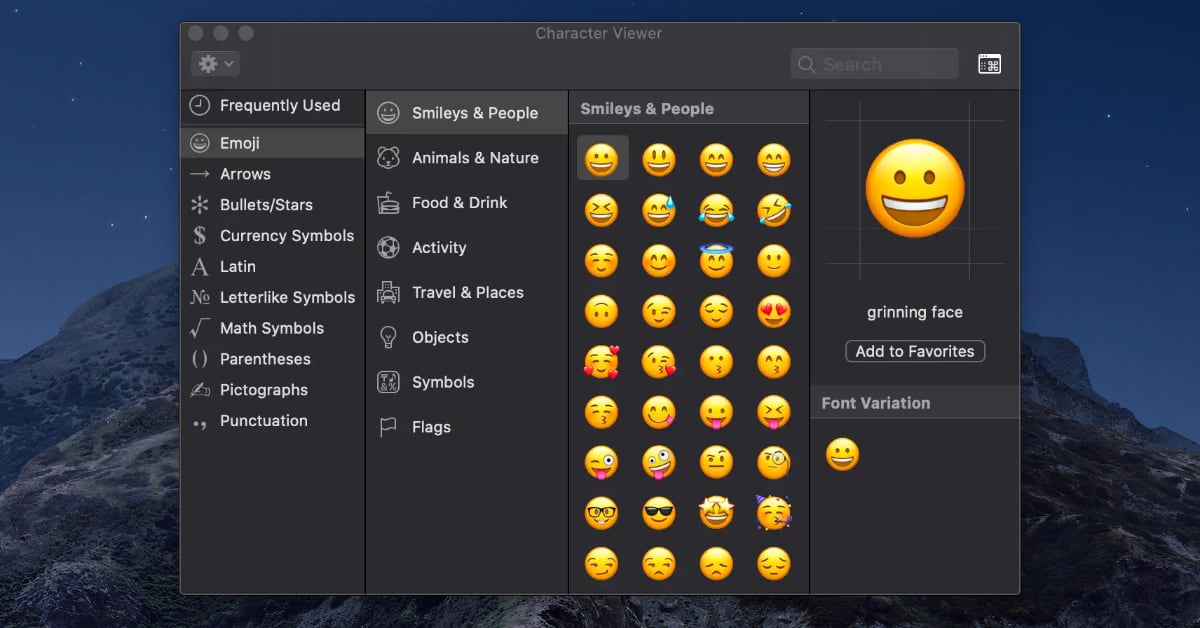
This is your golden ticket. Whenever you're in a text field – whether you’re drafting an email in Mail, typing a message in Messages, composing a tweet, or even filling out a form online – hit Control + Command + Spacebar. Watch in delight as a small, character viewer window appears, brimming with all sorts of goodies, including your beloved emojis.
This little window isn't just for emojis, by the way. It’s also where you’ll find special characters like ©, ™, and various accented letters if you ever need them. But for our purposes, the emoji tab is where the party’s at. You’ll see them neatly categorized, from smiley faces and people to animals, food, activities, and so much more. It’s a veritable smorgasbord of digital expression!
The beauty of this method is its universality. It works across almost every application on your Mac that allows text input. No need to copy and paste from a website or remember obscure codes. Just a few keystrokes and you’re in emoji heaven.
Navigating the Emoji-verse: Tips and Tricks
Once that character viewer pops up, you might feel a tiny bit overwhelmed by the sheer volume of options. It’s like walking into a candy store for the first time! But don't worry, we've got some pro tips to help you navigate the emoji-verse like a seasoned pro.
Searching for Specific Emojis
Don't want to scroll endlessly? The emoji picker is incredibly smart. At the top of the character viewer, you’ll find a search bar. Start typing what you're looking for, and the picker will instantly filter the results. Want a cat? Type "cat." Looking for a specific food? Try "pizza" or "avocado." It’s incredibly intuitive and saves you so much time. This feature is a game-changer, especially when you're in a hurry to convey your thoughts.
Think about it: you're trying to tell a friend you're "feeling under the weather," and instead of typing it all out, you search "sick" and find the 🤧 or 🤒 emoji. Instant visual communication! It's like having a secret language at your fingertips.
Skin Tone Variations: Inclusivity in Pixels
One of the most significant advancements in the emoji world is the introduction of skin tone modifiers. Many emojis depicting people, hands, and body parts now come with options to reflect a diverse range of skin tones. To access these variations, simply click and hold on an emoji that has skin tone options. A small pop-up menu will appear, allowing you to select the desired tone. This thoughtful feature ensures that more people can find emojis that represent them, fostering a more inclusive digital landscape.
This was a huge step forward for emoji representation. It moved beyond a default, often perceived as pale, to offer a spectrum. It’s a small detail, but in the vast world of digital interactions, it makes a big difference in how people feel seen and represented.
Frequent Emojis: Your Personal Hall of Fame
As you use emojis, your Mac learns your habits. The emoji picker intelligently displays your most frequently used emojis at the top of the list. This "Favorites" or "Frequently Used" section becomes your personal emoji shortcut, making it even quicker to deploy your go-to icons. It’s like having a curated collection of your most expressive characters, readily available for any situation.
![How to Get Emojis on Mac [2024 Guide] | Beebom](https://static.beebom.com/wp-content/uploads/2024/05/How-Get-Emojis-on-Mac.jpg)
It’s a subtle but brilliant piece of user-friendliness. You know that one emoji you use for everything? Like the ✨ for sparkle and magic, or the 😂 for uncontrollable laughter? They’ll naturally rise to the top, ready for your next digital pronouncement.
Adding Emojis to Your Text Replacement (for the Ultra-Efficient)
For those who truly want to optimize their emoji workflow, Mac’s Text Replacement feature is your secret weapon. This allows you to create custom shortcuts for frequently used phrases or, in our case, emojis. Head to System Settings (or System Preferences on older macOS versions) > Keyboard > Text Replacements.
Here, you can add a new entry. In the "Replace" field, type a short, memorable sequence of characters (e.g., :smiley: or lolface). In the "With" field, paste the emoji you want to associate with that shortcut. Now, whenever you type your custom shortcut in any text field, it will automatically expand into the chosen emoji. This is pure genius for those who use the same few emojis constantly.
Imagine typing :thumbsup: and magically getting a 👍. Or typing :celebrate: and seeing a 🎉 appear. It’s like having your own personalized emoji cheat sheet, ready to deploy at a moment's notice. It’s the ultimate in digital efficiency, and honestly, it just feels cool.
Beyond the Basics: A Little Emoji Culture
Emojis aren't just random pictures; they've developed their own culture and nuances. Understanding some of these can make your emoji game even stronger.

The Double-Edged Sword of Emojis
While emojis are fantastic for adding tone and personality, they can also be misinterpreted. The classic example is the 😉 (winking face). Depending on the context and the sender, it can mean anything from playful teasing to sarcasm to genuine flirtation. It’s always a good idea to consider your audience and the overall message when deploying emojis.
And let’s not forget the power of a single, well-placed emoji. A simple 👍 might seem straightforward, but in some contexts, it can come across as dismissive. It's a reminder that even in our digital world, communication is an art form, and emojis are just another tool in our expressive palette.
The Evolving Emoji Dictionary
The Unicode Consortium is the body responsible for standardizing emojis. New emojis are added every year, reflecting global trends, cultural shifts, and user demand. From the recent introduction of a melting face emoji 🫠 to more food items and diverse professions, the emoji dictionary is constantly growing and evolving. Keep an eye out for new additions – they might just be the perfect way to express your current mood or a new trend.
It's fascinating to see how emojis mirror our society. The push for more diverse representation, the inclusion of everyday objects and foods, and even abstract emotions – it all speaks to how deeply embedded these little icons have become in our global language.
Cultural Nuances and Emoji Meanings
While many emojis are universally understood, some can have different meanings or connotations in different cultures. For instance, the thumbs-up emoji 👍 is generally positive in Western cultures, but in some Middle Eastern countries, it can be considered offensive. It’s a good idea to be mindful of these differences, especially when communicating with people from diverse backgrounds. A little cultural awareness goes a long way in ensuring your message is received as intended.

This is where the fun truly lies – in the subtle complexities of global communication. It’s a reminder that even though we’re using digital tools, the human element of understanding and nuance remains paramount.
A Touch of Whimsy: Fun Emoji Facts
To round things off, let’s sprinkle in a few fun facts about our beloved emojis:
- The word "emoji" comes from the Japanese words "e" (picture) and "moji" (character).
- The first emojis were created in Japan in the late 1990s by Shigetaka Kurita for NTT DoCoMo's i-mode mobile internet platform.
- In 2015, Oxford Dictionaries named the "Face with Tears of Joy" emoji 😂 as its "Word" of the Year. Yes, an emoji beat out actual words!
- The most used emoji globally often fluctuates, but "Face with Tears of Joy" 😂 and "Red Heart" ❤️ consistently rank at the top.
- There are currently over 3,600 emojis in the Unicode standard. That’s a lot of tiny pictures!
These little tidbits are a testament to how far emojis have come, transforming from niche Japanese creations to a global communication phenomenon. They’ve truly earned their place in our digital lexicon.
The Heart of the Matter: Emojis in Our Daily Lives
Using emojis on your Mac is more than just a technical skill; it’s about enhancing your ability to connect, express, and even play in the digital realm. They add a layer of warmth to your emails, a spark to your text messages, and a touch of personality to your social media updates. They help bridge the gap that can sometimes exist in plain text, allowing for more nuanced and emotionally resonant communication.
Think about your last few digital conversations. How many times did an emoji add a smile to your face, clarify a misunderstanding, or simply make you feel more connected to the person on the other end? They’re the silent, colourful threads that weave through our daily digital interactions, making them richer and more human. So go forth, experiment, and embrace the wonderfully expressive world of emojis on your Mac. Your digital conversations will thank you for it!